
Smartlogic

אוטומציה ובקרה

מהי אוטומציה ובקרה?

מאמר זה מספק הגדרה מקצועית למונח אוטומציה ובקרה, מונה רכיבים הנכללים במערכות בקרה ואוטומציה ומציג אספקטים רלוונטיים נוספים לנושא הנידון.

הגדרת המונח פיתוח אוטומציה ובקרה

המונח אוטומציה – Automation מתאר שימוש במכונות, מערכות בקרה וטכנולוגית מידע (Information Technology – IT) כדי להפיק את המרב בתהליכי יצור ואספקת שירותים.

יתרונות וחסרונות

היתרונות העיקריים של אוטומציה הם:

  • הגברת התפוקה או פרודוקטיביות.
  • שיפור האיכות והגדלת יכולת חיזוי האיכות.
  • שיפור אחידות התהליכים והמוצרים.

בד"כ מתקינים ומשתמשים באוטומציה במקרים הבאים:

  • בתהליכי יצור לקיצור זמן המחזור, ושיפור התפוקה, האיכות והאחידות.
  • בתהליכים שמצריכים דרגת דיוק גבוהה.
  • מילוי מקום של עובדים בפעילויות שמצריכות כוח פיזי או פעילות מונוטונית.
  • מילוי מקום של עובדים בתנאי סיכון (כגון סכנת בערה, עבודה בחלל, עבודה תת-מימית וכו').
  • בביצוע פעילויות מעבר ליכולת האנושית מבחינת גודל, משקל, מהירות, כוח סבל וכו'.
  • יתרון כלכלי – אוטומציה יכולה לשפר את כלכלת מיזמים וחברות.
  • שחרור עובדים למילוי תפקידים אחרים.
  • אספקת עבודות ברמה גבוהה יותר בתכנון, פריסה, התקנה, הפעלה ותחזוקה של ציוד אוטומטי.

החסרונות העיקריים של אוטומציה הם:

  • סיכון ו/או פגיעות בבטיחות התהליכים – למערכת אוטומטית רמה מוגבלת של אינטליגנציה, ולכן היא יותר רגישה לביצוע שגיאות.
  • הוצאות פיתוח בלתי צפויות – הוצאות המחקר ופיתוח של אוטומציית תהליך יכולות להיות גדולות יותר מהחסכונות המופקים מהמערכת האוטומטית המושגת.
  • הוצאות התחלתיות גבוהות – אוטומציה של תהליך יצור או מתקן מצריך השקעה התחלתית עצומה בהשוואה למחיר היחידתי של המוצר, למרות שמחיר האוטומציה מתחלק בין מספר רב של מוצרים.

 מגבלות

  • הטכנולוגיה במצבה הנוכחי לא מאפשרת אוטומציה ובקרה של כל הפעילויות הרצויות.
  • כאשר רמת האוטומציה של תהליך הולך גדל, כמות העבודה שנחסכת והשיפור ברמת האיכות פוחתים, ואיתם הכדאיות הכלכלית.


הגדרת המונח בקרה אוטומטית

מתייחסת לשימוש בתיאורית הבקרה לוויסות תהליכים או תנאים ללא התערבות ישירה של בן אדם. בצורה הפשוטה ביותר של מעגל בקרה אוטומטי, בקר משווה ערך נמדד בתוך תהליך עם ערך מתוך סדרת ערכים שנקבעה מראש, ומעבד את אות הסטייה שנוצרה כך שהתהליך נשאר במסגרת הערך שנקבע למרות ההפרעות.

רכיבים של מערכת בקרה אוטומטית

מושג עיקרי בבקרה אוטומטית הוא מערכת בקרה אוטומטית, שמספקת בקרה וניטור של סוגים שונים של מערכות רלוונטיות, כגון ייצור, ניהול, וכו'. לדוגמה, אפשר לתכנן מערכת בקרה לשימור גבולות מוגדרים של ערכי טמפרטורה, לחץ ולחות בתוך מתקן ייצור.

מערכת בקרה מורכבת ממגוון רכיבים מבוקרים, ומשוב (feedback) של נתוני בקרה ממכשירי מדידה במעגל סגור (closed loop), שמאפשרים פעולה נכונה של רכיבי המערכת (כגון אלו הרשומים בהמשך) בהתאם לערכים שנקבעו מראש:

  • רגשים (sensors), שמודדים תנאים פיסיקליים, כגון טמפרטורה, לחץ, גובה נוזל, וכו'.
  • בקרים (controllers), שיכולים להיות החל מרכיבים פיסיקליים פשוטים ועד בקרים דיגיטליים מורכבים או מחשבים משובצים (embedded).
  • מפעילים (actuators), שמגיבים למדידות הרגשים ופועלים בהתאם להוראות הבקרים; לדוגמה, בבקרת כניסת אנרגיה, כגון, זרימת גז למבער במערכת חימום, או חשמל למנוע במקרר, או משאבה.
  • תחנת/ות מחשב, שמקושרות לבקרים. המחשבים משמשים להצגת ערכים נמדדים שהתקבלו מהבקרים במסכים של ממשק אדם/מכונה (HMI – Human/Machine Interface), ולשנות ערכים נקבעים (settings), כדי לאפשר ניטור ובקרה עכשוויים (online) של המערכת ע"י המשתמשים.

 רגשים (Sensors)

רגשים, שמודדים תנאים פיסיקליים, כוללים בד"כ אמצעים לשדר את הערכים שהם מודדים ל בקרים המתאימים; במקרה זה הם גם נקראים משדרים (transmitters). הם יכולים לכלול בנוסף מצגות ערכים (indicators) לפיקוח ויזואלי קל ע"י המשתמש.

בקרים (Controllers)

הבקרים הם הרכיבים החשובים ביותר במערכת בקרה אוטומטית. הם יכולים להיות החל מרכיבים פיסיקליים פשוטים ועד בקרים דיגיטליים מורכבים או מחשבים משובצים. הבקרים מנתחים ומעבדים את הערכים הנמדדים ע"י הרגשים ושולטים על המערכת בהתאם, בצירוף עם מחשבים מחוברים לבקרים; המחשבים כוללים תוכנות HMI לניטור ובקרה של המערכת.

דוגמאות של בקרים:

  •  בקרים לוגיים שניתנים לתכנות (PLCs – Programmable Logic Controllers)*
  • בקרים דיגיטליים ישירים (DDCs – Direct Digital Controllers)
  • יחידות קצה רחוקות (RTUs – Remote Terminal Units)

מפעילים (Actuators)

המפעילים מגיבים למדידות הרגשים ופועלים בהתאם להוראות הבקרים. דוגמאות של המפעילים הם: מתגים המגיבים להפרשי לחץ (DPSs – Differential Pressure Switches), מרסני נפח ממונעים (MVDs – Motorized Volume Dampers), מקררים ותנורים חשמליים, וכן משאבות ומפוחים, שמאפשרים כיוונוני טמפרטורה, לחץ, לחות, ותנאים פיסיקליים אחרים, כדי לתחום אותם בהתאם לערכים שנקבעו מראש.

תחנת/ות מחשב

תחנה מחשב אחת או יותר שמקושרות לבקרים מקבלות ערכים נמדדים מהבקרים ומציגים ערכים אלו, וכמו כן מצב פעולת רכיבי המערכת במסכים של ממשק  HMI לניטור עכשווי של המערכת. הערכים הנמדדים ניתנים להשוואה עם ערכים מותרים שנקבעו מראש, ואם הערכים הנמדדים חורגים מהגבולות המותרים, אפשר להציג הודעת אזהרה. ניתן להשתמש בממשק  HMI גם כדי לשנות את הערכים המותרים ולנטר את מצב פעולת רכיבי המערכת כתגובה לשינויים.

* סמארט לוג'יק משתמשת בבניית מערכות אוטומציה ובקרה בבקרים של חברת Siemens  וחברת אלן ברדלי – Allen-Bradley.

סמארטלוג'יק משווקת בין היתר את המוצרים הנ"ל:

6XV1830-0EH10, 6ES7131-4BF00-0AA0, 6ES7193-4CA40-0AA0, 6ES7134-4GD00-0AB0, 6ES7193-4CA40-0AA0, 6ES7138-4CA01-0AA0, 6ES7193-4CC20-0AA0, 6ES7590-1AB60-0AA0, 6ES7511-1AK00-0AB0, 6ES7954-8LP01-0AA0, 6ES7155-6AU00-0BN0, 1746-NO4V, 1769-L16ER-BB1B.
 

ממשק אדם-מכונה HMI – אוטומציה ובקרה

מה זה HMI?

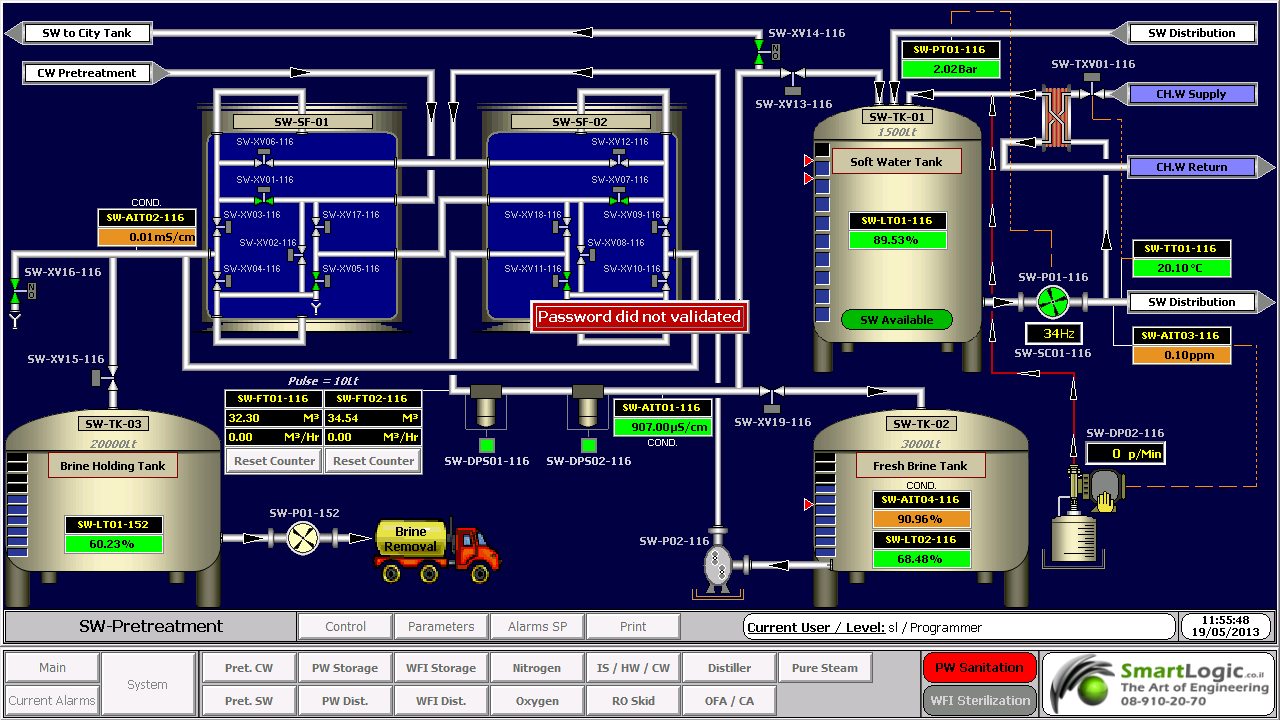
ממשק אדם-מכונה Human-Machine Interface – HMI מתרחש בתחום בו חלה אינטראקציה בן בני אדם ומכונות. מטרת האינטראקציה היא אפשרות  לניטור ובקרה יעילים של  אותן מכונות ע"י מפעיליהן, כאשר המכונות מספקות מידע בהיזון חוזר שמאפשר למפעילים לקחת החלטות נכונות בזמן התהליך. לממשק זה יש שימוש נרחב בעיצוב, יצור ובקרה על ציוד תעשייתי, ועל ניטור ובקרה על תהליכים תעשייתיים.

עם השימוש הגדל במחשבים אישיים ובקרים ממוחשביםProgrammable Logic Controller – PLC, הפך HMI למונח  המתייחס לרוב לייצוג הגרפי של הציוד והתהליכים התעשייתיים על פני מסכי המחשבים.

סמארטלוג'יק משתמשת ב -PLCs מתוצרת סימנס (Siemens) ואלן ברדלי (Allen Bradley)  לדוגמא :

6XV1830-0EH10, 6ES7131-4BF00-0AA0,6ES7193-4CA40-0AA0,6ES7134-4GD00-0AB0,6ES7193-4CA40-0AA0, 6ES7138-4CA01-0AA0,6ES7193-4CC20-0AA0, 6ES7590-1AB60-0AA0, 6ES7511-1AK00-0AB0, 6ES7954-8LP01-0AA0,6ES7155-6AU00-0BN0

מונח אחר, פחות שימושי הוא ממשק איש-מכונה הוא  Man-Machine Interface – HMI. מונח זה היה נפוץ אך זכה להתרעמות מצד ארגוני הנשים שדיברו על כך שגם נשים הם משתמשות בממשקים אלו ומהוות חלק מהם כך שונה השם למונח הכללי אדם או באנגלית Human.

HMI מערב ציוד (חומרה) היקפי, ורכיבי תוכנה, כגון ממשקים גרפיים.

בתחום המקושר ל- HMI, שנקרא Human-Computer Interaction – HCI, חוקרים את הייצוב והשימוש בטכנולוגיית המחשב, תוך מיקוד מיוחד בממשקים בין אנשים ומחשבים. החוקרים בתחום זה מתבוננים בצורות שבהם אנשים פועלים מול מחשבים, ומעצבים טכנולוגיות  שמאפשרות אינטראקציה  בין אנשים ומחשבים באופנים חדשים.

אנשים  פועלים מול מחשבים בצורות שונות, והממשק בו משתמשים משחק תפקיד מכריע בהקלה באינטראקציה. אפליקציות במחשב שולחני, דפדפן (browser) אינטרנטי,  מחשבים נישאים, וכו', משתמשות בממשק לשימוש גרפי Graphical User Interface – GUI באופן הנפוץ ביותר; ממשק לשימוש קולי Voice User Interface – VUI, פחות נפוץ, משמש לזיהוי דיבור ומערכות סינתוז synthesizing. השימוש ב- multi-modal GUI מאפשר להשתלב עם גורמים מסוימים שלא ניתנים  לתקשורת עם כלי ממשק אחרים.

שימוש ב-HMI לצורכי בקרה ואוטומציה

בתחום הבקרה והאוטומציה אנו עוסקים רבות בממשק Human-Machine Interface – HMI בעת תכנון ותפעול מערכות בקרה תעשייתיות.

תכנון וביצוע פרויקטים הנדסיים בתחום הבקרה האוטומציה היא המומחיות של סמארטלוג'יק, בקרה מפעלית ובקרות תהליך, בקרות מבנה BMS.  שיטות עבודה שלנו מאפשרות ביצוע אינטגרציה במהירות שיא, בין פרויקט חדש ומערכות המפעל הקיימות. סמארטלוג'יק מבצעת פרויקטי אוטומציה ובקרה מודולארית למתקני יצור תוך שימוש בתקן S-88.  סמארטלוג'יק היא גם  נציגה בלעדית של Siemens בארץ לתמיכה במערכת PCS7 ועובדת על בסיס קבוע, עם מרכז התמיכה העולמי בגרמניה באמצעות מערכת בקרת איכות מחמירה העומדת בתקן ISO9000.

להדרכה איך גורמים ל HMI לעבוד עם הרשאות ווינדוס לחצו כאן.

אוטומציה ובקרה – בקר דיגיטלי ישיר DDC

אוטומציה ובקרה – בקר דיגיטלי ישיר Direct Digital Controller -DDC

המונח DDC  מייצג בד"כ בקרה דיגיטלית ישירה (Direct Digital Control) אך גם בקר דיגיטלי ישיר (Direct Digital Controller).

בקרה מסוג DDC היא בקרה אוטומטית של מצב או תהליך ע"י בקר דיגיטלי. בקר מסוג DDC מורכב מבקרים מבוססים על מיקרופרוססורים (microprocessors) עם בקרה לוגית מבוצעת בעזרת תוכנה. מתמרים אנלוגיים/דיגיטליים (analog-to-digital (A/D) converters) מתמירים ערכים אנלוגיים לאותות דיגיטליות שמיקרופרוססור יכול להשתמש בהן. רגשים אנלוגיים יכולים להפיק ערכי התנגדות, מתח או זרם. רוב מערכות הבקרה מבזרים את התוכנה בין בקרים מרוחקים (remote) כדי להימנע מהצורך ביכולת בתקשורת רציפה ולאפשר יכולת פעולה עצמאית (stand-alone) של הבקרים. מחשב המערכת משמש בעיקר לניטור המצב של מערכת ניהול האנרגיה, שימור עותקי תוכניות לגיבוי, ולרישום התראות ואירועים.

יתרונות ה- DDC – בקר דיגיטלי ישיר

יתרונות בקרת DDC מעל לטכנולוגיות בקרה קודמות (פניאומאטיקה או בקרה אלקטרונית מבוזרת) מתבטאות בשיפור יעילות הבקרה במערכת. שלושת יתרונות העיקריים של בקרת DDC הם:

  • שיפור ביעילות הבקרה
  • שיפור ביעילות תפעול המערכת
  • שיפור ביעילות השימוש באנרגיה

 שיפור ביעילות הבקרה

DDC מעניקה בקרה יעילה יותר של מערכות חימום, אוורור ומיזוג אוויר (HVAC – Heating, Ventilating and Air Conditioning), ע"י הפקת נתונים מנוטרים מדויקים יותר. הרגשים האלקטרוניים שמודדים את הפרמטרים הנפוצים במערכות HVAC  (טמפרטורה,לחות ולחץ) הם מטבעם מדויקים בהרבה מקודמיהם הפניאומאטיים. מכיוון שלוגיקת חוג הבקרה כלול בתוכנת ה- DDC, ניתן לשנות את הלוגיקה הזו בקלות. כך, ה- DDC מעניק גמיש רבה יותר בשינוי לו"ז לאיפוס (reset), נקודות נקבעות (set points) ולוגיקת בקרה מערכתית.

שיפור ביעילות תפעול המערכת

מערכות DDC מטבעם יכולות להשתלב בקלות רבה בתוך מערכות מבוססות על מחשב, כגון מערכות בקרת אש, כניסה/אבטחה (access/security), תאורה, ניהול תחזוקה, ועוד. יכולות המגמות ב- DDC מאפשרות לטכנאי או מהנדס לאתר תקלות ולפתור אותן. יכולות אלו מאפשרות גם להציג את הנתונים בפורמטים שונים. הנתונים מאפשרים קריאה של המגמות שיכולות להישמר ולעבור ניתוח לגילוי מגמות של ביצועי המערכות לאורך נתון.

שיפור ביעילות השימוש באנרגיה

קיימות אסטרטגיות בקרה רבות להשגת יעילות בשימוש באנרגיה בלוגיקה פניאומטית שניתנות לשכפול בלוגיקת DDC. האפשרות להוסיף פונקציות מתמטיות מורכבות יותר (שמושגות בקלות בתוכנה), מובילה לשגרות(routines)  נוספות יעילות מבחינה אנרגטית שניתנות לשימוש עם DDC.

אסטרטגיות כגון ניטור והגבלת צריכת אנרגיה ניתנות להשגה בקלות עם מערכות DDC. אפשר לנטר ולבקר צריכה כוללת במתקן יצור ע"י איפוס נקודות נקבעות (set points) מבוססות על רמות צריכה שונות.

דפוסי צריכת אנרגיה ניתנות לניטור ע"י אחסנת מגמות. אפשר גם לקבוע לו"ז של הפעלת/כיבוי (on/off) ציוד באפליקציות בהן הלו"ז משתנה בתכיפות.

 רכיבי בקר דיגיטלי ישיר DDC

נקודות (Points)

המונח נקודה (Point) משמש לתיאור מיקום אחסנת נתונים במערכת DDC. הנתונים יכולים להגיע מרגשים או מלוגיקה או חישובי תוכנה. למיקום כל נתון מאוחסן יש אמצעי ייחודי לזיהוי או מיעון.

נתונים (Data)

נתוני DDC ניתנים לסיווג בשלושה אופנים:

  • לפי סוג (type)
  • לפי כיוון זרימה (flow direction)
  • לפי מקור (source)

נתונים לפי סוג (Data Type)

לפי סיווג זה, נתונים יכולים להיות דיגיטליים, אנלוגיים ומצטברים.

נתונים דיגיטליים נקראים גם דיסקרטיים או בינאריים. ערך של נתון דיגיטלי יכול להיות 0 או 1, ומייצג בד"כ מצב או סטאטוס של קבוצת מגעים.

נתונים אנלוגיים הם מספריים, דצימאליים, ובד"כ מציגים ערכי כניסה כגון טמפרטורה,לחות יחסית ולחץ, או משתנה אחר הנמדד במערכת חימום, אוורור ומיזוג אוויר (HVAC – Heating, Ventilating and Air Conditioning).

נתונים מצטברים הם גם מספריים, דצימאליים, אך כאן סיכום הערכים מאוחסן.

נתונים לפי כיוון זרימה (Data Flow Direction)

נתונים אלו מתייחסים לכיוון הזרימה ביחס לרכיב/לוגיקת DDC: נקודות כניסה מציגות נתונים המשמשים כמידע נכנס ל- DDC, ונקודות יציאה מציגות מידע יוצא מה- DDC.

נתונים לפי מקור (Data Source)

נתונים ניתנים לסיווג כחיצוניים אם הם מתקבלים מרכיב חיצוני או נשלחים לרכיב חיצוני. נקודות חיצוניות נקראות לפעמים נקודות חומרה. נתונים חיצוניים יכולים להיות דיגיטליים, אנלוגיים ומצטברים, וכמו כן יכולים להיות נתוני כניסה או יציאה.

נתונים פנימיים מייצגים נתונים מופקים ע"י הלוגיקה של תוכנת הבקרה. נתונים אלו יכולים להיות דיגיטליים, אנלוגיים ומצטברים. מונחים המשמשים לכינוי נקודות פנימיות הם נקודות וירטואליות, נקודות מספריות, נקודות נתונים ונקודות תוכנה.

סמארטלוג'יק מעניקה שירותים המסתמכים על ידע וניסיון רב בעבודה עם מערכות מים, RO ,CIP, מזקקות, מערכות HVAC ,Utilities, ומודולים מוכנים סטנדרט S-88 שפיתחנו עבור מערכות אלו

ולידציה – Operation Qualification – OQ- part 2

ולידציה – Operation Qualification – OQ- part 2

Protocol Preparation Overview

This article provide overviews of the main test procedures and verification, and their purposes. This OQ procedure is generic, and relevance of the test procedures and verifications provided below depends on the composition of the system under validation

:Note

As mentioned in the previous artcle on OQ Protocol Contents, the final contents of the OQ protocol are tailored according to the type and size of the system under validation. Since this document is generic, it covers test procedures that may not be necessary in small or simple systems

:Where relevant, the OQ procedure may consists of five main test procedures

HMI Screen Test Procedure – intended to verify that the HMI screens provide the graphic design and functionality required for properly monitoring and controlling the environmental conditions in the user's

Parameters Lists Verification – intended to verify that the system parameters lists comply with the values specified in the SSO

Two types of parameters are checked

Process parameters

Alarm parameters

System Operation Test Procedure – intended to verify that system monitoring and control components are capable of maintaining the user's facility within specified temperature, humidity and pressure levels

System Alarms Test Procedure – intended to verify that when the specified temperature, humidity and pressure levels exceed its specified limits, an alarm message is displayed, and an SMS or e-mail notification is sent to relevant personnel

Test of HMI Compliance with 21 CFR Part 11 – This test is intended to verify that the HMI meets Valtech Cardio's URS regarding 21 CFR Part 11. These : requirements are divided into 5 categories for the sake of clarity

Security

Electronic Records

Audit Trail

Archive

Backup

 HMI Screen Test Procedure

This section includes specific test procedures for all the relevant HMI screens, where each test procedure serves to verify that the specific HMI screen provides the graphic design and functionality required for its intended purpose within the monitoring and controlling functions

Parameters Lists Verification

:This procedure covers the verifications of two types of parameters

Process parameters

Alarm parameters

Process Parameters List Verification

This procedure is intended to verify that:

The system enables to set the default values of the process set-points of each monitored environmental parameter.

The system provides automatically the corresponding low and high limits of these default values. These limit values are listed in  below

The system rejects all the SP values that exceed their allowed ranges, as specified in the SSO

Alarm Parameters List Verification

:This procedure is intended to verify that

The system enables to set the default values of the alarm set-points of each monitored environmental parameter

The system provides automatically the corresponding low and high limits of these default values

The system rejects all the SP values that exceed their allowed ranges, as specified in the SSO

 System Operation Test Procedure

This procedure is intended to verify that system monitoring and control components are capable of maintaining the user's facility within specified temperature, humidity and pressure levels. For this purpose, it is necessary to temporarily change set-points, in order to activate the control devices

System Alarms Test Procedures

This procedure is intended to verify that, when an environmental parameter value exceeds the specified normal range, the system reacts as specified in the SSO, by providing a specified alarm indication, a relevant e-mail alarm message, and relevant records in the Current Alarms and Historical Alarms screens

Test of HMI Compliance with 21 CFR Part 11

This test is intended to verify that the HMI meets the user's URS regarding 21 CFR Part 11. These requirements are divided into 5 categories for the sake of :clarity

Security

Electronic Records

Audit Trail

Archive

Backup


ולידציה -Testing Process Automation Systems

ולידציה – Testing Process Automation Systems  

 Testing Responsibilities  Supplier and User

Where a Supplier has been assessed and its quality management system found to be acceptable, the User may benefit from the testing already carried out as part of the product development life cycle in order to minimize additional testing.

Similarly, the User may benefit from the testing carried out by the Supplier as part of the application, for example, to allow a small sample of tests to be repeated at witnessed FAT.

                        Example of Life Cycle for a Custom Application

Supplier Product Life Cycle

For example in a life cycle where a new application is developed for an embedded control system,  the Supplier's product may be SW or tools used to develop the User specific application. The Supplier of the control system has been assessed and its quality management system found to be acceptable. Thus, the User does not need to repeat the testing of product functionality. The testing should instead concentrate on the application of the control system

     End User Application Life Cycle

Assuming that the application is critical to product quality and includes a custom sequence coded as a sequence function chart, a test approach could be agreed :that includes the following elements

Supplier's module testing of the sequence function chart program.

Supplier's integration testing (100% test) and FAT (sampled) to demonstrate correct interaction configuration of the control system and correct operation of the process equipment.

SAT and IQ/OQ/PQ of the control system as part of the process equipment.

                      Example of Life Cycle for a Standard Application

                   Supplier Product Life Cycle

In the case  of a life cycle where a standard application is purchased containing an embedded control system, the control system Supplier has been assessed and its quality management system found to be acceptable. Thus, the User does not need to repeat the testing of product functionality (including mature library functions such as standard control modules) or of the standard application. The testing has to cover only the setup and use of the application.

                    End User Application Life Cycle

Assuming that the application is still critical to product quality, there is now much lower risk associated with the application development, as the configuration is limited to selecting the required functions and entering setup parameters. A test approach could, therefore, be agreed including the following elements:

FAT to demonstrate correct setup of the control system and correct operation of the process equipment.

SAT and IQ/OQ/PQ of the control system as part of the process equipment.

ולידציה -Testing and HW/SW Type and Maturity

ולידציה -Testing and HW/SW Type and Maturity – GAMP

Process automation systems generally comprise several elements. Categorizing these elements according to those described in GAMP 4 can assist in targeting testing and validation effort.

Some functional elements may be fully contained within the system standard packages or firmware (FW), while others may require different degrees of configuration or customization. In general, the greater the degree of customization, the greater the scope of testing required.

For example, if an item of the process equipment is to be controlled, the User may have several options for implementing the process control system functional element.

:Typical Test Phases for Process Automation Systems

Complex control exists as single, mature 'equipment level' library module, where functions can be selected/ deselected and  setup parameters entered

For example, sterilizer module with selectable cycle types

Application Life Cycle Testing: selection of functions, setup parameters

:Typical Test Phases

FAT and /or

SAT

IQ/OQ/PQ of process equipment

Complex control built up from mature, interlinked 'device level' library modules, which must have correct parameters entered

For example, sterilizer control, built up from valve, motor, PID, set-point program modules.

Application Life Cycle Testing: selection and linking of modules functions to give correct functionality, setup parameters

:Typical Test Phases

FAT

SAT

IQ/OQ/PQ of process equipment

Complex control built up from application specific modules, themselves built up from low-level library modules, or from simple coded steps within a predefined structure.

For example, sterilizer control configured in ladder logic

Application Life Cycle Testing: functionality of custom coded modules, selection and linking of modules functions to give correct functionality, setup parameters

:Typical Test Phases

Module test

FAT

SAT

IQ/OQ/PQ of process equipment

Complex control custom added

For example, sterilizer control coded in C++

Application Life Cycle Testing: functionality of custom coded modules, interaction between custom coded modules, selection and linking of modules functions to give correct functionality,setup parameters.

:Typical Test Phases

Module test

Module integration test

FAT

SAT

IQ/OQ/PQ of process equipment

:Notes

The suggested test phases listed above are typical only; they may be increased or decreased to reflect the complexity of the application, and the impact on product quality, patient safety and data integrity

The above assumes mature, 'industry proven' library modules. If these are created specifically for the application, then they need to be treated as custom code

Smartlogic expertise in validation of current and new systems to meet the most rigid requirements of the FDA and CFR protocols.

ולידציה – GAMP – Test Example – part 3

Good Automated Manufacturing Practice (GAMP) – Test Example

Testing Process Automation Systems

This article cover  the third part of  our  Good Automated Manufacturing Practice (GAMP) test example. This part will cover  the typical test phases for Factory Acceptance Test – FAT, Site Acceptance Test – SAT / Installation Qualification – IQ, Operation Qualification – OQ and Performance Qualification – PQ

Typical Test Phases – GAMP – Test Example

 Typical test phases for a complex process automation system. This example assumes that the system is configured by a Supplier and delivered to site after a FAT. Test system can also be configured by the system integrator or by the User. In this case, the same coverage is required, but the test phasing and location may be different.

The User and Supplier should work together to develop an overall approach to testing that reflects the risk assessment output and ensures adequate test coverage of the functionality, whilst avoiding unnecessary repeated tests.

Factory Acceptance Test – FAT

Done at the Supplier's premises after Supplier's integration testing, and before the system is released for delivery to the User's site

The required coverage should reflect the relative risk priority associated with the system element under test. This coverage can increase if problem are found within the initial sample.

In determining the required coverage, the User needs to base decisions on the risk assessment output taking into account both the potential effect on product quality and safety resulting from the process, and the intrinsic risk likelihood associated with the method of implementation.

Before performing risk assessment to decide on the required coverage, the User should review the supplier's internal tests to confirm that they are adequately documented.

Site Acceptance Test – SAT / Installation Qualification – IQ

Done at the User's premises after installation of the system on site

:The required coverage should include

Checking that the full system, including HW, SW backups, and documentation has been delivered to site in a condition suitable to its intended purpose

Checking that the site environment suits the specification of the installed equipment: temperature, humidity, pressure, dust, vibration, interference, etc

Checking that the system has been correctly installed.

Demonstration the system still operates as it was when accepted during the FAT, typically by re-recording system components and versions, and by re-repeating a small sample of FATs on site

Testing any elements which could be adequately tested in the FAT environment, typically interfaces to other equipment, networks, etc

Re-testing, following remedial action on any element subject to conditional release at the end of the FAT

Operation Qualification – OQ and Performance Qualification – PQ

Done at the User's premises after SAT/IQ

If a system has been fully tested in the FAT, after successful completion of the IQ (along with any additional field functional tests and calibrations), the system is treated as an integrated part of the process equipment qualification. This should ensure that the full system, procedures and trained personnel are ready for production.

End of GAMP – Test Example – part 3.


אוטומציה ובקרה – איך מכינים HMI לבדיקת לוח בקרה

אוטומציה ובקרה – איך מכינים HMI  לבדיקת לוח בקרה בצורה הטובה ביותר

מהנדסי סמארט לוג'יק מסבירים איך להכין ממשק משתמש קל ונח לבדיקת לוחות בקרה וחשמל באמצעות Cimplicity.

Electrical cabinets Testing 1

Electrical cabinets Testing 1

להדרכה בנושא איך גורמים ל HMI לעבוד עם הרשאות ווינדוס לחץ כאן

ולידציה – GAMP – Hardware & Software Test Environments

ולידציה –  GAMP – Hardware & Software  Test Environments

Good Automated Manufacturing Practice (GAMP) Hardware (HW) Environment Test

HW can be categorized according to both GAMP 4 HW category (standard or custom) and its function within the test environment. It can be one o f these three things

 Part of the system under test, i.e., part of the production HW

 Test HW representing part of the production environment, which may be needed because it is not feasible to include a certain element of the production system in the test environment

A separate test system, which may be used to represent an external system

          Representative Test Environment

As started previously, the HW environment should represent as close as possible the production environment

For example, if the test environment uses a standard network hub of the same type as the production environment, then the substitution probable introduces low probability if invalid test results in the production environment. If, however, the network cabling in the test environment is uses short patch cables, whilst the real environment has cable runs close to the maximum recommended length, there is clearly a possibility of different network behavior, and additional tests on site may be needed to prove proper network performance

                    Control of Test Environment

For standard HW (per GAMP 4 HW Category 1), the manufacturer's reference and serial numbers should be recorded.

For custom HW (per GAMP 4 HW Category 2), the version of the item and its controlling specification should also be recorded.

For all test HW, any applicable calibration status should be recorded in the context of the specific

                         Removal from Production Environment

If the test HW is added in the way that it may appear in the production environment, then, this should be documented a temporary modification to the production system. Removal of the temporary modification should be documented as well

Good Automated Manufacturing Practice (GAMP)  Software (SW) Environment Test

Test SW can also be categorized according to both GAMP 4 SW category and its function within the test environment:

Part of the system under test, i.e., part of the production HW

Test SW representing part of the production environment

A separate test system

              Representative Test Environment

The SW environment should represent as close as possible the production environment

For example, if the test environment uses a process controller of the same type as the production environment, then the substitution probable introduces low probability if invalid test results in the production environment. If, however, a particular interface is simulated in the test environment, a possibility remains that different timing factors or process dynamics could affect the operation in the production environment, and additional tests on the production interface may be appropriate

                        Control of Test Environment

For standard SW (per GAMP 4 SW Category 1, 2 or 3), the manufacturer's reference and version numbers (including installed patch cables) should be recorded. Any configuration or setup parameters should be controlled

For configured or custom SW (per GAMP 4 SW Category 4 or 5), the item should be placed under configuration management and the version in use recorded

              Removal from Production Environment

If the test SW is added in the way that it may appear in the production environment, then, this should be documented a temporary modification to the production system. Removal of the temporary modification should be documented as well

ולידציה –  GAMP – Hardware & Software  Test Environments

ולידציה – Introduction to GAMP Test Environments

ולידציה – Introduction to Good Automated Manufacturing Practice (GAMP) Test Environments

The environment in which testing is conducted should be determined based on the life cycle output of the risk assessment. The following general principles apply:

  • The proposed test environment should represent as close as possible the production environment. The differences between the two should be detailed in the Test Specification or Protocol, and should be subject to impact assessment.
  • The test environment should be controlled and recorded to a level of detail that would allow it to be reconstructed if necessary. Such control includes:
  • System hardware (HW) and software (SW) components
  • Test HW (versions, serial numbers, as appropriate)
  • Test SW (version control of any simulations)
  • Test data (version control of any test data sets, test recipes, etc.)
  • Test user accounts
  • Where test HW/SW/data/user accounts are applied as they may appear in the production environment, controls should be available to ensure that they can either be removed cleanly or isolated from use (either logically or in time).
  • Where the test environment is required to undergo a temporary change to facilitate the execution of specific tests, both the change and its removal must be formally documented.

 GAMP Test Environments

In many circumstances it is undesirable to conduct all testing on the final production environment. Common examples include:

  • Non-availability of infrastructure at the point in the project life cycle when testing is carried out.
  • Non-availability of certain interfaces.
  • Requirement to test changes outside of the production environment prior to installation.
  • Requirement to carry out tests which may be destructive to the production environment.


The progression of SW build from a development environment through production environment depends on the risk priority associated with the system being installed or the change being made, and on factors such as the ease of possible modification removal from the system.

A change to a custom data processing module in a large business system may require progression from a development environment to a test environment, to a validation environment, and then to the production environment. This may be required because the change is a high risk priority, and, even if the if the original module could be restored easily, the test data may remain in the production environment.

Some tests, e.g., Performance Qualification (PQ), or part of it, may need to be conducted in the production environment.