Smartlogic

בקרה ואוטומציה, כל מה שרצית לדעת מהיסודות

סרטון הסבר- רקע על מערכות בקרה ואוטומציה לתעשייה 

מערכת בקרה הינה מערכת אוטומטית ששולטת על ציוד המתקן.

מערכת בקרה בצורת PLC- בקר מתוכנת – עם כניסות ויציאות אלקטרומכאניות.

הבקר מאפשר שליטה אוטומטית על מערכות שבעבר היו ידניות, כגון: ברזים, מערכות אוורור, וכו.

עוד תוכלו ללמוד בסרטון: 

  • מה זה תפ"מ
  • מה התפקיד של בקר PLC במערכת ואיך הוא עובד 
  • כרטיסי הרחבה לבקר 
  • ממה מורכבת מערכת בקרה ומה הן כוללות (עבודה עם רגשים, מנועים )
  • עבודה עם remote I/O –  באתרים גדולים

מציג: מר אילן שעיה,מומחה בקרה ומנכ"ל חברת סמארט לוג'יק


אוטומציה ובקרה

מהי אוטומציה ובקרה?

מאמר זה מספק הגדרה מקצועית למונח אוטומציה ובקרה, מונה רכיבים הנכללים במערכות בקרה ואוטומציה ומציג אספקטים רלוונטיים נוספים לנושא הנידון.

הגדרת המונח פיתוח אוטומציה ובקרה

המונח אוטומציה – Automation מתאר שימוש במכונות, מערכות בקרה וטכנולוגית מידע (Information Technology – IT) כדי להפיק את המרב בתהליכי יצור ואספקת שירותים.

יתרונות וחסרונות

היתרונות העיקריים של אוטומציה הם:

  • הגברת התפוקה או פרודוקטיביות.
  • שיפור האיכות והגדלת יכולת חיזוי האיכות.
  • שיפור אחידות התהליכים והמוצרים.

בד"כ מתקינים ומשתמשים באוטומציה במקרים הבאים:

  • בתהליכי יצור לקיצור זמן המחזור, ושיפור התפוקה, האיכות והאחידות.
  • בתהליכים שמצריכים דרגת דיוק גבוהה.
  • מילוי מקום של עובדים בפעילויות שמצריכות כוח פיזי או פעילות מונוטונית.
  • מילוי מקום של עובדים בתנאי סיכון (כגון סכנת בערה, עבודה בחלל, עבודה תת-מימית וכו').
  • בביצוע פעילויות מעבר ליכולת האנושית מבחינת גודל, משקל, מהירות, כוח סבל וכו'.
  • יתרון כלכלי – אוטומציה יכולה לשפר את כלכלת מיזמים וחברות.
  • שחרור עובדים למילוי תפקידים אחרים.
  • אספקת עבודות ברמה גבוהה יותר בתכנון, פריסה, התקנה, הפעלה ותחזוקה של ציוד אוטומטי.

החסרונות העיקריים של אוטומציה הם:

  • סיכון ו/או פגיעות בבטיחות התהליכים – למערכת אוטומטית רמה מוגבלת של אינטליגנציה, ולכן היא יותר רגישה לביצוע שגיאות.
  • הוצאות פיתוח בלתי צפויות – הוצאות המחקר ופיתוח של אוטומציית תהליך יכולות להיות גדולות יותר מהחסכונות המופקים מהמערכת האוטומטית המושגת.
  • הוצאות התחלתיות גבוהות – אוטומציה של תהליך יצור או מתקן מצריך השקעה התחלתית עצומה בהשוואה למחיר היחידתי של המוצר, למרות שמחיר האוטומציה מתחלק בין מספר רב של מוצרים.

 מגבלות

  • הטכנולוגיה במצבה הנוכחי לא מאפשרת אוטומציה ובקרה של כל הפעילויות הרצויות.
  • כאשר רמת האוטומציה של תהליך הולך גדל, כמות העבודה שנחסכת והשיפור ברמת האיכות פוחתים, ואיתם הכדאיות הכלכלית.


הגדרת המונח בקרה אוטומטית

מתייחסת לשימוש בתיאורית הבקרה לוויסות תהליכים או תנאים ללא התערבות ישירה של בן אדם. בצורה הפשוטה ביותר של מעגל בקרה אוטומטי, בקר משווה ערך נמדד בתוך תהליך עם ערך מתוך סדרת ערכים שנקבעה מראש, ומעבד את אות הסטייה שנוצרה כך שהתהליך נשאר במסגרת הערך שנקבע למרות ההפרעות.

רכיבים של מערכת בקרה אוטומטית

מושג עיקרי בבקרה אוטומטית הוא מערכת בקרה אוטומטית, שמספקת בקרה וניטור של סוגים שונים של מערכות רלוונטיות, כגון ייצור, ניהול, וכו'. לדוגמה, אפשר לתכנן מערכת בקרה לשימור גבולות מוגדרים של ערכי טמפרטורה, לחץ ולחות בתוך מתקן ייצור.

מערכת בקרה מורכבת ממגוון רכיבים מבוקרים, ומשוב (feedback) של נתוני בקרה ממכשירי מדידה במעגל סגור (closed loop), שמאפשרים פעולה נכונה של רכיבי המערכת (כגון אלו הרשומים בהמשך) בהתאם לערכים שנקבעו מראש:

  • רגשים (sensors), שמודדים תנאים פיסיקליים, כגון טמפרטורה, לחץ, גובה נוזל, וכו'.
  • בקרים (controllers), שיכולים להיות החל מרכיבים פיסיקליים פשוטים ועד בקרים דיגיטליים מורכבים או מחשבים משובצים (embedded).
  • מפעילים (actuators), שמגיבים למדידות הרגשים ופועלים בהתאם להוראות הבקרים; לדוגמה, בבקרת כניסת אנרגיה, כגון, זרימת גז למבער במערכת חימום, או חשמל למנוע במקרר, או משאבה.
  • תחנת/ות מחשב, שמקושרות לבקרים. המחשבים משמשים להצגת ערכים נמדדים שהתקבלו מהבקרים במסכים של ממשק אדם/מכונה (HMI – Human/Machine Interface), ולשנות ערכים נקבעים (settings), כדי לאפשר ניטור ובקרה עכשוויים (online) של המערכת ע"י המשתמשים.

 רגשים (Sensors)

רגשים, שמודדים תנאים פיסיקליים, כוללים בד"כ אמצעים לשדר את הערכים שהם מודדים ל בקרים המתאימים; במקרה זה הם גם נקראים משדרים (transmitters). הם יכולים לכלול בנוסף מצגות ערכים (indicators) לפיקוח ויזואלי קל ע"י המשתמש.

בקרים (Controllers)

הבקרים הם הרכיבים החשובים ביותר במערכת בקרה אוטומטית. הם יכולים להיות החל מרכיבים פיסיקליים פשוטים ועד בקרים דיגיטליים מורכבים או מחשבים משובצים. הבקרים מנתחים ומעבדים את הערכים הנמדדים ע"י הרגשים ושולטים על המערכת בהתאם, בצירוף עם מחשבים מחוברים לבקרים; המחשבים כוללים תוכנות HMI לניטור ובקרה של המערכת.

דוגמאות של בקרים:

  •  בקרים לוגיים שניתנים לתכנות (PLCs – Programmable Logic Controllers)*
  • בקרים דיגיטליים ישירים (DDCs – Direct Digital Controllers)
  • יחידות קצה רחוקות (RTUs – Remote Terminal Units)

מפעילים (Actuators)

המפעילים מגיבים למדידות הרגשים ופועלים בהתאם להוראות הבקרים. דוגמאות של המפעילים הם: מתגים המגיבים להפרשי לחץ (DPSs – Differential Pressure Switches), מרסני נפח ממונעים (MVDs – Motorized Volume Dampers), מקררים ותנורים חשמליים, וכן משאבות ומפוחים, שמאפשרים כיוונוני טמפרטורה, לחץ, לחות, ותנאים פיסיקליים אחרים, כדי לתחום אותם בהתאם לערכים שנקבעו מראש.

תחנת/ות מחשב

תחנה מחשב אחת או יותר שמקושרות לבקרים מקבלות ערכים נמדדים מהבקרים ומציגים ערכים אלו, וכמו כן מצב פעולת רכיבי המערכת במסכים של ממשק  HMI לניטור עכשווי של המערכת. הערכים הנמדדים ניתנים להשוואה עם ערכים מותרים שנקבעו מראש, ואם הערכים הנמדדים חורגים מהגבולות המותרים, אפשר להציג הודעת אזהרה. ניתן להשתמש בממשק  HMI גם כדי לשנות את הערכים המותרים ולנטר את מצב פעולת רכיבי המערכת כתגובה לשינויים.

* סמארט לוג'יק משתמשת בבניית מערכות אוטומציה ובקרה בבקרים של חברת Siemens  וחברת אלן ברדלי – Allen-Bradley.

סמארטלוג'יק משווקת בין היתר את המוצרים הנ"ל:

6XV1830-0EH10, 6ES7131-4BF00-0AA0, 6ES7193-4CA40-0AA0, 6ES7134-4GD00-0AB0, 6ES7193-4CA40-0AA0, 6ES7138-4CA01-0AA0, 6ES7193-4CC20-0AA0, 6ES7590-1AB60-0AA0, 6ES7511-1AK00-0AB0, 6ES7954-8LP01-0AA0, 6ES7155-6AU00-0BN0, 1746-NO4V, 1769-L16ER-BB1B.


ממשק אדם-מכונה HMI – אוטומציה ובקרה

מה זה HMI?

ממשק אדם-מכונה Human-Machine Interface – HMI מתרחש בתחום בו חלה אינטראקציה בן בני אדם ומכונות. מטרת האינטראקציה היא אפשרות  לניטור ובקרה יעילים של  אותן מכונות ע"י מפעיליהן, כאשר המכונות מספקות מידע בהיזון חוזר שמאפשר למפעילים לקחת החלטות נכונות בזמן התהליך. לממשק זה יש שימוש נרחב בעיצוב, יצור ובקרה על ציוד תעשייתי, ועל ניטור ובקרה על תהליכים תעשייתיים.

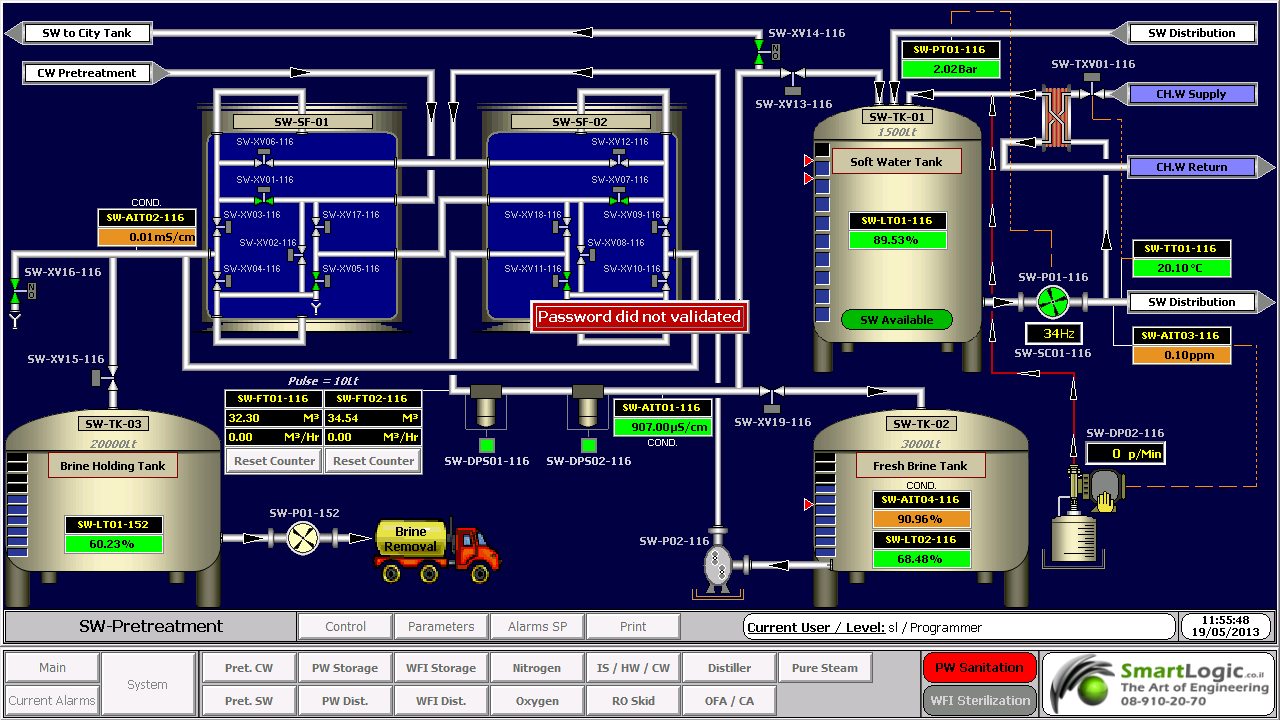
עם השימוש הגדל במחשבים אישיים ובקרים ממוחשביםProgrammable Logic Controller – PLC, הפך HMI למונח  המתייחס לרוב לייצוג הגרפי של הציוד והתהליכים התעשייתיים על פני מסכי המחשבים.

סמארטלוג'יק משתמשת ב -PLCs מתוצרת סימנס (Siemens) ואלן ברדלי (Allen Bradley)  לדוגמא :

6XV1830-0EH10, 6ES7131-4BF00-0AA0,6ES7193-4CA40-0AA0,6ES7134-4GD00-0AB0,6ES7193-4CA40-0AA0, 6ES7138-4CA01-0AA0,6ES7193-4CC20-0AA0, 6ES7590-1AB60-0AA0, 6ES7511-1AK00-0AB0, 6ES7954-8LP01-0AA0,6ES7155-6AU00-0BN0

מונח אחר, פחות שימושי הוא ממשק איש-מכונה הוא  Man-Machine Interface – HMI. מונח זה היה נפוץ אך זכה להתרעמות מצד ארגוני הנשים שדיברו על כך שגם נשים הם משתמשות בממשקים אלו ומהוות חלק מהם כך שונה השם למונח הכללי אדם או באנגלית Human.

HMI מערב ציוד (חומרה) היקפי, ורכיבי תוכנה, כגון ממשקים גרפיים.

בתחום המקושר ל- HMI, שנקרא Human-Computer Interaction – HCI, חוקרים את הייצוב והשימוש בטכנולוגיית המחשב, תוך מיקוד מיוחד בממשקים בין אנשים ומחשבים. החוקרים בתחום זה מתבוננים בצורות שבהם אנשים פועלים מול מחשבים, ומעצבים טכנולוגיות  שמאפשרות אינטראקציה  בין אנשים ומחשבים באופנים חדשים.

אנשים  פועלים מול מחשבים בצורות שונות, והממשק בו משתמשים משחק תפקיד מכריע בהקלה באינטראקציה. אפליקציות במחשב שולחני, דפדפן (browser) אינטרנטי,  מחשבים נישאים, וכו', משתמשות בממשק לשימוש גרפי Graphical User Interface – GUI באופן הנפוץ ביותר; ממשק לשימוש קולי Voice User Interface – VUI, פחות נפוץ, משמש לזיהוי דיבור ומערכות סינתוז synthesizing. השימוש ב- multi-modal GUI מאפשר להשתלב עם גורמים מסוימים שלא ניתנים  לתקשורת עם כלי ממשק אחרים.

שימוש ב-HMI לצורכי בקרה ואוטומציה

בתחום הבקרה והאוטומציה אנו עוסקים רבות בממשק Human-Machine Interface – HMI בעת תכנון ותפעול מערכות בקרה תעשייתיות.

תכנון וביצוע פרויקטים הנדסיים בתחום הבקרה האוטומציה היא המומחיות של סמארטלוג'יק, בקרה מפעלית ובקרות תהליך, בקרות מבנה BMS.  שיטות עבודה שלנו מאפשרות ביצוע אינטגרציה במהירות שיא, בין פרויקט חדש ומערכות המפעל הקיימות. סמארטלוג'יק מבצעת פרויקטי אוטומציה ובקרה מודולארית למתקני יצור תוך שימוש בתקן S-88.  סמארטלוג'יק היא גם  נציגה בלעדית של Siemens בארץ לתמיכה במערכת PCS7 ועובדת על בסיס קבוע, עם מרכז התמיכה העולמי בגרמניה באמצעות מערכת בקרת איכות מחמירה העומדת בתקן ISO9000.

להדרכה איך גורמים ל HMI לעבוד עם הרשאות ווינדוס לחצו כאן.

אוטומציה ובקרה – בקר דיגיטלי ישיר DDC

אוטומציה ובקרה – בקר דיגיטלי ישיר Direct Digital Controller -DDC

המונח DDC  מייצג בד"כ בקרה דיגיטלית ישירה (Direct Digital Control) אך גם בקר דיגיטלי ישיר (Direct Digital Controller).

בקרה מסוג DDC היא בקרה אוטומטית של מצב או תהליך ע"י בקר דיגיטלי. בקר מסוג DDC מורכב מבקרים מבוססים על מיקרופרוססורים (microprocessors) עם בקרה לוגית מבוצעת בעזרת תוכנה. מתמרים אנלוגיים/דיגיטליים (analog-to-digital (A/D) converters) מתמירים ערכים אנלוגיים לאותות דיגיטליות שמיקרופרוססור יכול להשתמש בהן. רגשים אנלוגיים יכולים להפיק ערכי התנגדות, מתח או זרם. רוב מערכות הבקרה מבזרים את התוכנה בין בקרים מרוחקים (remote) כדי להימנע מהצורך ביכולת בתקשורת רציפה ולאפשר יכולת פעולה עצמאית (stand-alone) של הבקרים. מחשב המערכת משמש בעיקר לניטור המצב של מערכת ניהול האנרגיה, שימור עותקי תוכניות לגיבוי, ולרישום התראות ואירועים.

יתרונות ה- DDC – בקר דיגיטלי ישיר

יתרונות בקרת DDC מעל לטכנולוגיות בקרה קודמות (פניאומאטיקה או בקרה אלקטרונית מבוזרת) מתבטאות בשיפור יעילות הבקרה במערכת. שלושת יתרונות העיקריים של בקרת DDC הם:

  • שיפור ביעילות הבקרה
  • שיפור ביעילות תפעול המערכת
  • שיפור ביעילות השימוש באנרגיה

 שיפור ביעילות הבקרה

DDC מעניקה בקרה יעילה יותר של מערכות חימום, אוורור ומיזוג אוויר (HVAC – Heating, Ventilating and Air Conditioning), ע"י הפקת נתונים מנוטרים מדויקים יותר. הרגשים האלקטרוניים שמודדים את הפרמטרים הנפוצים במערכות HVAC  (טמפרטורה,לחות ולחץ) הם מטבעם מדויקים בהרבה מקודמיהם הפניאומאטיים. מכיוון שלוגיקת חוג הבקרה כלול בתוכנת ה- DDC, ניתן לשנות את הלוגיקה הזו בקלות. כך, ה- DDC מעניק גמיש רבה יותר בשינוי לו"ז לאיפוס (reset), נקודות נקבעות (set points) ולוגיקת בקרה מערכתית.

שיפור ביעילות תפעול המערכת

מערכות DDC מטבעם יכולות להשתלב בקלות רבה בתוך מערכות מבוססות על מחשב, כגון מערכות בקרת אש, כניסה/אבטחה (access/security), תאורה, ניהול תחזוקה, ועוד. יכולות המגמות ב- DDC מאפשרות לטכנאי או מהנדס לאתר תקלות ולפתור אותן. יכולות אלו מאפשרות גם להציג את הנתונים בפורמטים שונים. הנתונים מאפשרים קריאה של המגמות שיכולות להישמר ולעבור ניתוח לגילוי מגמות של ביצועי המערכות לאורך נתון.

שיפור ביעילות השימוש באנרגיה

קיימות אסטרטגיות בקרה רבות להשגת יעילות בשימוש באנרגיה בלוגיקה פניאומטית שניתנות לשכפול בלוגיקת DDC. האפשרות להוסיף פונקציות מתמטיות מורכבות יותר (שמושגות בקלות בתוכנה), מובילה לשגרות(routines)  נוספות יעילות מבחינה אנרגטית שניתנות לשימוש עם DDC.

אסטרטגיות כגון ניטור והגבלת צריכת אנרגיה ניתנות להשגה בקלות עם מערכות DDC. אפשר לנטר ולבקר צריכה כוללת במתקן יצור ע"י איפוס נקודות נקבעות (set points) מבוססות על רמות צריכה שונות.

דפוסי צריכת אנרגיה ניתנות לניטור ע"י אחסנת מגמות. אפשר גם לקבוע לו"ז של הפעלת/כיבוי (on/off) ציוד באפליקציות בהן הלו"ז משתנה בתכיפות.

 רכיבי בקר דיגיטלי ישיר DDC

נקודות (Points)

המונח נקודה (Point) משמש לתיאור מיקום אחסנת נתונים במערכת DDC. הנתונים יכולים להגיע מרגשים או מלוגיקה או חישובי תוכנה. למיקום כל נתון מאוחסן יש אמצעי ייחודי לזיהוי או מיעון.

נתונים (Data)

נתוני DDC ניתנים לסיווג בשלושה אופנים:

  • לפי סוג (type)
  • לפי כיוון זרימה (flow direction)
  • לפי מקור (source)

נתונים לפי סוג (Data Type)

לפי סיווג זה, נתונים יכולים להיות דיגיטליים, אנלוגיים ומצטברים.

נתונים דיגיטליים נקראים גם דיסקרטיים או בינאריים. ערך של נתון דיגיטלי יכול להיות 0 או 1, ומייצג בד"כ מצב או סטאטוס של קבוצת מגעים.

נתונים אנלוגיים הם מספריים, דצימאליים, ובד"כ מציגים ערכי כניסה כגון טמפרטורה,לחות יחסית ולחץ, או משתנה אחר הנמדד במערכת חימום, אוורור ומיזוג אוויר (HVAC – Heating, Ventilating and Air Conditioning).

נתונים מצטברים הם גם מספריים, דצימאליים, אך כאן סיכום הערכים מאוחסן.

נתונים לפי כיוון זרימה (Data Flow Direction)

נתונים אלו מתייחסים לכיוון הזרימה ביחס לרכיב/לוגיקת DDC: נקודות כניסה מציגות נתונים המשמשים כמידע נכנס ל- DDC, ונקודות יציאה מציגות מידע יוצא מה- DDC.

נתונים לפי מקור (Data Source)

נתונים ניתנים לסיווג כחיצוניים אם הם מתקבלים מרכיב חיצוני או נשלחים לרכיב חיצוני. נקודות חיצוניות נקראות לפעמים נקודות חומרה. נתונים חיצוניים יכולים להיות דיגיטליים, אנלוגיים ומצטברים, וכמו כן יכולים להיות נתוני כניסה או יציאה.

נתונים פנימיים מייצגים נתונים מופקים ע"י הלוגיקה של תוכנת הבקרה. נתונים אלו יכולים להיות דיגיטליים, אנלוגיים ומצטברים. מונחים המשמשים לכינוי נקודות פנימיות הם נקודות וירטואליות, נקודות מספריות, נקודות נתונים ונקודות תוכנה.

סמארטלוג'יק מעניקה שירותים המסתמכים על ידע וניסיון רב בעבודה עם מערכות מים, RO ,CIP, מזקקות, מערכות HVAC ,Utilities, ומודולים מוכנים סטנדרט S-88 שפיתחנו עבור מערכות אלו

אוטומציה ובקרה – איך מגדירים מודם במערכת לשליחת SMS

אוטומציה ובקרה – איך מגדירים מודם עבור שליחת הודעות ממערכת הבקרה

מדריך זה נותן מספר נקודות מפתח להגדרת מודם 

הגדרת המודם

ע"מ להתחבר למודם ולהגדיר את הפרמטרים הרצוים לנו, עלינו להשתמש בתוכנת HyperTerminal. במחשבים אשר מערכת ההפעלה שלהן היא Windows 2000, התוכנה מובנת במערכת ההפעלה. אך במערכות ההפעלה Windows 7 ו-Vista, יש להעתיק את התוכנה מהלינק הזה, ולשים אותה במחשב הרצוי(2 קבצים: אפליקציה ו-DLL).

לאחר שפותחים את HyperTerminal, יש להגדיר חיבור חדש עם הפרמטרים הבאים:

(Port: COM# (# – the number of the port the modem is connected to

Rate: 115000, Usualy

Data bits: 8

Parity: None

Stop bits: 1

Flow Control: Hardware

לפני שמתחברים, יש לוודא כי כל האפליקציות המשתמשות באותו הפורט סגורות!

הצעד הבא הוא להגדיר את הקצב הרצוי לנו: 9600.

יש להריץ את הפקודה הבאה ב-HyperTerminal:

AT+IPR=9600

יש לזכור שלאחר ההגדרה, חייבים להגדיר את ה-HyperTerminal מחדש לקצב של 9600.

לאחר מכן, יש להגדיר את הפורמט של ההודעות כהודעות Text:

AT+CMGF=1

לאחר 2 הגדרות אלו, המודם מוכן לשליחת הודעות SMS. יש לבדוק זאת על ידי השימוש בפקודה הבאה:

<AT+CMGS=”+972#########”<Enter

<Test<Enter<

<Ctrl+Z><Enter>

היכן ש-######### הינו מספר הטלפון הרצוי.

אם עקבת אחר ההוראות לעיל, אתה אמור לקבל הודעת טקסט המכילה את המילה Test.

הגדרת תוכנת ה-U.C.ME

כעת ניתן להגדיר את תוכנת U.C.ME. לאחר ההתקנה, יש לפתוח את U.C.ME Configuration.


This tutorial was written by Iian Shaya, validation, automation and control expert

המדריך נכתב ע"י מר אילן שעיה , מומחה אוטומציה ובקרה.


ולידציה – FRS – Regulatory & HMI Requirements

ולידציה – FRS – Regulatory & HMI Requirements

 This article was written by Iian Shaya, validation,automation and control expert

Regulatory Requirements

These requirements cover all the FDA specifications regarding the system compliance with the 21 CFR Part 11 definitions, and also with usual validation documentation demands

Method to provide a computerized system that complies with 21 CFR Part 11 definitions, such as the system access control by the user's managing personnel, who shall be responsible for the content of the electronic records (ERs) contained in the system

Method to restrict logical access to the system according to specified authorization levels

Method to restrict logical access to the system only to specific user ID and password

Method to provide system capability to record the values, alarms, user changes and any other events, and provide readable forms and reports of ER data

Method to allow storage of historical events, current alarms and historical alarms data records on the computerized system database

Capability of data display to the user in "view only" mode, so the user cannot alter or delete data/records

Provision of user's capability to backup data daily, weekly and monthly, according to his procedures, to ensure protection of the records and to enable their accurate and ready retrieval throughout the records retention period

Provision by the supplier of a project plan and quality assurance (QA) processes during development and the testing stages as part of his QA systems

Provision by the supplier of the following documents

Functional Requirements Specification – FRS

Functional Design Specification- FDS

IO List

Schedule of System Operation – SSO

Installation Qualification (IQ) protocol

Operation Qualification (OQ) protocol

Performance Qualification (PQ) protocol

HMI Requirements

These requirements are intended to provide the URS demands from the HMI screens, regarding proper graphic design and functionality for controlling and monitoring the system, as specified in customer's contract with the supplier. The HMI screens provided usually are of the following types

Main Screen

Synoptic screens for displaying online values and status

Parameters screens for displaying temperature, humidity and pressure parameters values

Data logging and storage of historical trends, alarms and events

Tabular screens for displaying alarms

Graphical screens for displaying trends

 This article was written by Iian Shaya, validation,automation and control expert

אוטומציה ובקרה – PID Control

אוטומציה ובקרה – PID Control

Between the measuring device and the final control element comes the controller. Its function is to receive themeasured output signal Ym (t) and after comparing it with the set point YSP to produce the actuating signal c (t) in such a way as to return the out put to the desired value YSP. Therefore the input to the controller is the error ε(t) = YSP –Ym (t), while its out put is c (t). The various types of continous feedback controllers differ in the way they relate ε (t) and c (t).

 The best feed back controller is the proportional – integral- derivative controller.

In the industrial practice it is commonly known as the proportional-plus-reset-plus-rate controller.

The actuating signal of this controller is given by the following mathematical equation.

c (t) = Kc ε (t) + Kc/Ʈ10 t ε (t) dt + Kc ƮD dε/dt + Cs

Kc = proportional gain of the controller

Cs = controllers bias signal (i.e. its actuating signal when ε =0)

Ʈ1 = integral time constant OR reset time in minutes

TD = derivative time constant in minutes

Proportional = Kc ε (t)

Here the actuating out put c (t) is proportional to the error ε (t) = YSP –Ym (t),

It is clear that larger the gain Kc, the higher the sensitivity of controllers actuating signal to deviations (ε).

ie: Y SP =100, Ym(t) =96, hence error ε = 4.

If Kc=1, then controllers actuating signal, c = 4% to close/open, for TCV.

If Kc=3, then controllers actuating signal, c= 12% to close/open, for TCV

Integral = Kc/Ʈ10 t ε (t) dt

The reset time, Ʈ1 is the time needed by the controller to repeat the initial proportional action change in its out put. Reset time, Ʈ1 is an adjustable parameter and some manufacturers do not calibrate their controllers in terms of Ʈ1, but in terms of its reciprocals, 1/ Ʈ1 (repeats per minute), which is known as the reset rate.

ie:

Reset rate=0.1, it means the reset time is = 1/0.1= 10 scans, Hence every 10 scans the controller will add the proportional action change (Kc ε (t)).

In most of the PID's time scans is configurable and called "update loop time" if it equals to 1 then every 10 seconds the controller will add the proportional action

Remark:

The integral term of a controller causes its output to continue changing as long as there is a non-zero error. Often the errors cannot be eliminated quickly, and given enough time they produce larger and larger values for the integral term, which in turn keeps increasing the control action until it is saturated ( ie: the valve is completely open or closed) &  called as integral wind up.

Derivative = Kc ƮD dε/dt

ƮD is the derivative time constant in minutes, with the presence of the derivative term, (dε/dt), the PID controller anticipates what error will be in the immediate future and applies a control action which is proportional to the current rate of change in the error. Due to this property, the derivative control action is referred to as anticipatory control.

Because of the forecasting action of the derivative parameter, the control valve will never "rest" it will always open and close to maintain the Setpoint therefore – this parameter must be used only for fast PID's such as compressed air control, Steam control, ETC

אילן שעיה Ilan Shaya 

,This guide was written by llan shaya, control and automation specialist

סמארט לוג’יק  מתכננת ומבצעת ביצוע פרויקטים הנדסיים בתחום הבקרה האוטומציה, בקרה מפעלית ובקרות תהליך, בקרות מבנה

אוטומציה ובקרה – איך מכינים HMI לבדיקת לוח בקרה

אוטומציה ובקרה – איך מכינים HMI  לבדיקת לוח בקרה בצורה הטובה ביותר

מהנדסי סמארט לוג'יק מסבירים איך להכין ממשק משתמש קל ונח לבדיקת לוחות בקרה וחשמל באמצעות Cimplicity.

Electrical cabinets Testing 1

Electrical cabinets Testing 1

להדרכה בנושא איך גורמים ל HMI לעבוד עם הרשאות ווינדוס לחץ כאן

ולידציה – Introduction to GAMP Test Environments

ולידציה – Introduction to Good Automated Manufacturing Practice (GAMP) Test Environments

The environment in which testing is conducted should be determined based on the life cycle output of the risk assessment. The following general principles apply:

  • The proposed test environment should represent as close as possible the production environment. The differences between the two should be detailed in the Test Specification or Protocol, and should be subject to impact assessment.
  • The test environment should be controlled and recorded to a level of detail that would allow it to be reconstructed if necessary. Such control includes:
  • System hardware (HW) and software (SW) components
  • Test HW (versions, serial numbers, as appropriate)
  • Test SW (version control of any simulations)
  • Test data (version control of any test data sets, test recipes, etc.)
  • Test user accounts
  • Where test HW/SW/data/user accounts are applied as they may appear in the production environment, controls should be available to ensure that they can either be removed cleanly or isolated from use (either logically or in time).
  • Where the test environment is required to undergo a temporary change to facilitate the execution of specific tests, both the change and its removal must be formally documented.

 GAMP Test Environments

In many circumstances it is undesirable to conduct all testing on the final production environment. Common examples include:

  • Non-availability of infrastructure at the point in the project life cycle when testing is carried out.
  • Non-availability of certain interfaces.
  • Requirement to test changes outside of the production environment prior to installation.
  • Requirement to carry out tests which may be destructive to the production environment.


The progression of SW build from a development environment through production environment depends on the risk priority associated with the system being installed or the change being made, and on factors such as the ease of possible modification removal from the system.

A change to a custom data processing module in a large business system may require progression from a development environment to a test environment, to a validation environment, and then to the production environment. This may be required because the change is a high risk priority, and, even if the if the original module could be restored easily, the test data may remain in the production environment.

Some tests, e.g., Performance Qualification (PQ), or part of it, may need to be conducted in the production environment.


בקרה ואוטומציה ליט"אות -HVAC / AHU control

בקרה ואוטומציה ליט"אות -HVAC / AHU control

HVAC stands for Heating, Ventilating and Air Conditioning. AHU stands for Air Handling Unit.

HVAC and AHU control systems provide centralized monitoring and control of these systems, designed to maintain selected rooms in research and production facilities within specified pressure, temperature and humidity levels. This is achieved by operating and monitoring active components or actuators, and by monitoring environmental conditions, such as pressure, temperature and humidity, using corresponding sensors located in the HVAC and AHU system and the selected rooms.

Smartlogic has an extensive knowledge and experience in HVAC & Ahu systems.

The monitored values in HVAC and AHU systems and rooms are analyzed and processed by one or more controllers, such as programmable logic controllers (PLCs) or direct digital controllers (DDCs), which control the system accordingly in conjunction with an HMI installed on a PC connected to the PLCs or DDCs. The levels of the environmental conditions are compared to set-points (SPs) that are displayed and can be determined using human-machine interface (HMI) screens.

The level adjustments of the environmental conditions, such as pressure, temperature and humidity are performed using temperature control valves, electrical chillers and heaters, blowers, differential pressure switches, motorized flow dampers, etc. Fault switch, such as temperature, pressure and humidity switches, and fire alarm switches in HVAC/AHU systems provide alarm indications in case of failures.

The PLCs or DDCs currently used to control HVAC and AHU devices, such as valves, and heaters, receive analog and digital inputs from the sensors and devices installed in HVAC and AHU systems and, according to control logic, provide analog or digital outputs to control the devices.

An example of a device installed in HVAC and AHU systems, and controlled by PLCs or DDCs is a chiller.

Example – Chiller Control

A chiller is a machine that removes heat from a liquid via a vapor-compression or absorption refrigeration cycle. This liquid can then be circulated through a heat exchanger to cool air or equipment, as required.

Use in Air Conditioning

In air conditioning systems, chilled water is typically distributed to heat exchangers, or coils, in HVAC and AHU systems, or other type of terminal devices which cool the air in its respective space(s), and then the chilled water is re-circulated back to the chiller to be cooled again. These cooling coils transfer sensible heat (heat exchanged by a body thermodynamic system that has as its sole effect a change of temperature) and latent heat (heat released or absorbed by a body or a thermodynamic system during a process that occurs without a change in temperature) from the air to the chilled water, thus cooling and usually dehumidifying the air stream.

Use in Industry

In industrial application, chilled water or other liquid from the chiller is pumped through process or laboratory equipment. Industrial chillers are used for controlled cooling of products, mechanisms and factory machinery in a wide range of industries. They are often used in the plastic industry in injection and blow molding, metal working cutting oils, welding equipment, die-casting and machine tooling, chemical processing, pharmaceutical formulation, food and beverage processing, paper and cement processing, vacuum systems, X-ray diffraction, power supplies and power generation stations, analytical equipment, semiconductors, compressed air and gas cooling. They are also used to cool high-heat specialized items such as MRI machines and lasers, and in hospitals, hotels and campuses.

Chillers for industrial applications can be centralized, where a single chiller serves multiple cooling needs, or decentralized where each application or machine has its own chiller. Each approach has its advantages. It is also possible to have a combination of both centralized and decentralized chillers, especially if the cooling requirements are the same for some applications or points of use, but not all.

Decentralized chillers are usually small in size and cooling capacity, while centralized chillers generally have larger capacities.

Chilled water is used to cool and dehumidify air in mid- to large-size commercial, industrial, and institutional facilities. Water chillers can be water-cooled, air-cooled, or cooled by evaporation. Water-cooled chillers incorporate the use of incorporate cooling towers which improve the chillers' thermodynamic effectiveness as compared to air-cooled chillers. Chillers cooled by evaporation offer higher efficiencies than air-cooled chillers but lower than water-cooled chillers.

Water-cooled chillers are typically intended for indoor installation and operation, and are cooled by a separate condenser water loop and connected to outdoor cooling towers to expel heat to the atmosphere.

Chillers cooled by air and evaporation are intended for outdoor installation and operation. Air-cooled machines are directly cooled by ambient air being mechanically circulated directly through the machine's condenser coil to expel heat to the atmosphere. Machines cooled by evaporation are similar, except they implement a mist of water over the condenser coil to aid in condenser cooling, making the machine more efficient than a traditional air-cooled machine.

Smartlogic has an extensive knowledge and experience in HVAC & Ahu systems.