Smartlogic

בקרה ואוטומציה, כל מה שרצית לדעת מהיסודות

סרטון הסבר- רקע על מערכות בקרה ואוטומציה לתעשייה 

מערכת בקרה הינה מערכת אוטומטית ששולטת על ציוד המתקן.

מערכת בקרה בצורת PLC- בקר מתוכנת – עם כניסות ויציאות אלקטרומכאניות.

הבקר מאפשר שליטה אוטומטית על מערכות שבעבר היו ידניות, כגון: ברזים, מערכות אוורור, וכו.

עוד תוכלו ללמוד בסרטון: 

  • מה זה תפ"מ
  • מה התפקיד של בקר PLC במערכת ואיך הוא עובד 
  • כרטיסי הרחבה לבקר 
  • ממה מורכבת מערכת בקרה ומה הן כוללות (עבודה עם רגשים, מנועים )
  • עבודה עם remote I/O –  באתרים גדולים

מציג: מר אילן שעיה,מומחה בקרה ומנכ"ל חברת סמארט לוג'יק


הדרכת תכנות לסביבת RSLogix500 – שימוש בכבל סיריאלי להתחברות

בסרטון תוכלו לראות איך מתחברים בקלות עם שימוש בכבל סיריאלי לבקר אלן ברדלי.

עבדו בפשטות עם דיאגרמת סולם

דיאגרמת סולם היא הדבר היחיד שאתם צריכים בשביל יישומי בקרת מכונה טיפוסיים, השתמשו בדיאגרמת סולם.

תקנים הם חשובים, אבל כמו עם מרבית התקנים רק בחלק מהתקנים נעשה שימוש נרחב.

הסטנדרט לבקר לוגי מתוכנת IEC 61131 הוא הדוגמה לכך. למרות שלסטנדרט IEC61131 יש ארבע שפות תכנות המגדירות את הנתונים בצורה טובה,ורכיבים מבניים, השארו עם דיאגרמת סולם, הסטנדרטים דה פקטו ל –PLCs ו-PAC בייצור שאינו רציף וייצור בדידים, יחסכו לכם כסף וישמרו בעתיד על יעילות.

 למרות שהעדפות אישיות ממלאות כאן תפקיד, רק השימוש בדיאגרמת סולם עבור בקרה רציפה שומר על הדברים פשוטים עבור מחלקת הפקדים של האינטרגטורים, מחלקת תחזוקה ומחלקת שירות לקוחות, התמיכה המהירה שהלקוח מקבל עבור הציוד שברשותו, עוזרת. לרוב המכריע של המתכנתים אין מודעות גדולה למפרט של IEC 61131 ו/או הזדקקות למפרט של IEC 61131 . ולמרות זאת, הסטנדרט קיים כבר יותר  מ-20 שנה. פועל יוצא שההשארות עם דיאגרמת סולם עוזרת.

מחשבים מבוססים בקרים לעומת בקרים מתוכנתים

מחשבים מבוססים בקרים PC-Based Controls לעומת בקרים לוגיים מתוכנתים PLC-Based Controls לאוטומציה

מחשבים אישיים מבוססי בקרים היו באופנה לפני עשור או יותר .הרבה מערכות נמסרו עם בקרות מחשב המבוססות על יתרונות שנעים החל מחלקים ועד פונקציונליות יתר ובעלות נמוכה יותר. ונראה כאילו שבשנים האחרונות ישנה נטייה לחזור למחשבים מבוססי בקרים מתוכנתים.

בואו ונסקור את היתרונות והחסרונות בפועל של כל אחד וזאת לאחר הטמעת מערכת הבקרים באמצעות ובשימוש שתי הגישות.


מחשבים מבוססי בקרים:

מחשבים מבוססי בקרים מתוכנתים על מחשבים עם תוכנת Windows וזאת כדי לתקשר ולנטר אחר טיפול בקווי ייצור כלליים או בטיפול בקו ייצור מסוים


יתרונות:

  • לא קשור לכל פלטפורמת חומרה אחרת.
  • תקשורת מהירה בין בקרים מתוכנתים והציוד
  • תומך ביותר משפת תכנות אחת.


חסרונות:

קושי בשדרוג כאשר גרסת Windows חדשה משתחררת.

  • קושי בהטמעת ויישום שינויים במערכת מכיוון שקשה למצוא מהנדסי בקרים ששולטים בנושא לעומק.
  • תמיכה במוצר לטווח ארוך דבר אשר קושר את המחשבים לגרסה שונה של Windows ואשר המחשבים שהם מבוססי בקרים חייבים לתמוך ב-PLC (בקר לוגי מתוכנת).
  • PLC (בקר לוגי מתוכנת) מבוסס בקרים.


בקר לוגי מתוכנת – בקרים מתוכנתים PLC

בקר לוגי מתוכנת (PLC) הוא מחשב קטן, הממוקם בדרך כלל בתוך לוח בקרה חשמלי גדול יותר, הבקר מתוכנת להפעיל מערכת שלמה או ציוד ספציפי. בניגוד למחשב טיפוסי,ניתן להשתמש ב- PLC  כדי להתמודד עם שפת תכנות לאוטומצית מכונה בלבד

יתרונות:

  • עמידות : מוקשה תעשייתית, יציב מאוד וללא הגבלות של Windows
  • אמינות : מחזיק מעמד מעל 20 שנה
  • אריכות חיים: מחזור החיים של ה- PLC (בקר לוגי מתוכנת) מעל 20 שנה ויותר.
  • היכרות עם השוק: אלפי מהנדסי בקרים יודעים איך לתכנת את ה- PLC (בקר לוגי מתוכנת) של היצרנים הראשיים כגון סימנס, אלאן בראדלי וכו'
  • תחזוקה: הרבה יותר קל לחשמלאים ולטכנאי בקרים לפתור בעיות במערכת עם שימוש ב PLC (בקר לוגי מתוכנת), ונראה שהם מאויימים על ידי מחשבים מבוססי בקרים, הסולם הלוגי שנהוג ב PLC  (בקר לוגי מתוכנת) מוכר להם.
  • אינטגרציה קלה : יצרני PLC (בקר לוגי מתוכנת) מייצרים סוגי חומרה שקלים לשילוב עם ה – PLC  (בקר לוגי מתוכנת) שלהם מה שאומר שיש הרבה תכונות מובנות.

חסרונות:

  • נתפס כיקר : יש לקחת את עלויות מחזור החיים בחשבון.
  • אפשרויות קווי I/O מוגבלות – יש נטייה להיות קשורים ליצרני ה – PLC  (בקר תוכנה לוגי מתוכנת).


הרוב המכריע של היישומים מתאים יותר עבור יישומי PLC, כמובן שיכולים להיות מיזמים ששם מחשבים מבוססי בקרים יכולים להוות יתרון אבל לעומת זאת החיסרון גם צריך להילקח בחשבון .ובמידה ויש מחשב שבו פועל מחשב מבוסס בקר קורס ואין לך גיבוי מוכן , אתה יכול להיות מושבת במשך ימים. ועם בקר לוגי  במקרה הגרוע ביותר הוא שתצטרכו לרוץ ולקנות בקר לוגי, להוריד את הפרויקט על גבי הבקר, ואתם שוב בפעולה תוך דקות ספורות.


לפגישת ייעוץ, אנא התקשרו 08-9102070


לחץ לסבר נוסף על בקר מתוכנת

אוטומציה ובקרה

מהי אוטומציה ובקרה?

מאמר זה מספק הגדרה מקצועית למונח אוטומציה ובקרה, מונה רכיבים הנכללים במערכות בקרה ואוטומציה ומציג אספקטים רלוונטיים נוספים לנושא הנידון.

הגדרת המונח פיתוח אוטומציה ובקרה

המונח אוטומציה – Automation מתאר שימוש במכונות, מערכות בקרה וטכנולוגית מידע (Information Technology – IT) כדי להפיק את המרב בתהליכי יצור ואספקת שירותים.

יתרונות וחסרונות

היתרונות העיקריים של אוטומציה הם:

  • הגברת התפוקה או פרודוקטיביות.
  • שיפור האיכות והגדלת יכולת חיזוי האיכות.
  • שיפור אחידות התהליכים והמוצרים.

בד"כ מתקינים ומשתמשים באוטומציה במקרים הבאים:

  • בתהליכי יצור לקיצור זמן המחזור, ושיפור התפוקה, האיכות והאחידות.
  • בתהליכים שמצריכים דרגת דיוק גבוהה.
  • מילוי מקום של עובדים בפעילויות שמצריכות כוח פיזי או פעילות מונוטונית.
  • מילוי מקום של עובדים בתנאי סיכון (כגון סכנת בערה, עבודה בחלל, עבודה תת-מימית וכו').
  • בביצוע פעילויות מעבר ליכולת האנושית מבחינת גודל, משקל, מהירות, כוח סבל וכו'.
  • יתרון כלכלי – אוטומציה יכולה לשפר את כלכלת מיזמים וחברות.
  • שחרור עובדים למילוי תפקידים אחרים.
  • אספקת עבודות ברמה גבוהה יותר בתכנון, פריסה, התקנה, הפעלה ותחזוקה של ציוד אוטומטי.

החסרונות העיקריים של אוטומציה הם:

  • סיכון ו/או פגיעות בבטיחות התהליכים – למערכת אוטומטית רמה מוגבלת של אינטליגנציה, ולכן היא יותר רגישה לביצוע שגיאות.
  • הוצאות פיתוח בלתי צפויות – הוצאות המחקר ופיתוח של אוטומציית תהליך יכולות להיות גדולות יותר מהחסכונות המופקים מהמערכת האוטומטית המושגת.
  • הוצאות התחלתיות גבוהות – אוטומציה של תהליך יצור או מתקן מצריך השקעה התחלתית עצומה בהשוואה למחיר היחידתי של המוצר, למרות שמחיר האוטומציה מתחלק בין מספר רב של מוצרים.

 מגבלות

  • הטכנולוגיה במצבה הנוכחי לא מאפשרת אוטומציה ובקרה של כל הפעילויות הרצויות.
  • כאשר רמת האוטומציה של תהליך הולך גדל, כמות העבודה שנחסכת והשיפור ברמת האיכות פוחתים, ואיתם הכדאיות הכלכלית.


הגדרת המונח בקרה אוטומטית

מתייחסת לשימוש בתיאורית הבקרה לוויסות תהליכים או תנאים ללא התערבות ישירה של בן אדם. בצורה הפשוטה ביותר של מעגל בקרה אוטומטי, בקר משווה ערך נמדד בתוך תהליך עם ערך מתוך סדרת ערכים שנקבעה מראש, ומעבד את אות הסטייה שנוצרה כך שהתהליך נשאר במסגרת הערך שנקבע למרות ההפרעות.

רכיבים של מערכת בקרה אוטומטית

מושג עיקרי בבקרה אוטומטית הוא מערכת בקרה אוטומטית, שמספקת בקרה וניטור של סוגים שונים של מערכות רלוונטיות, כגון ייצור, ניהול, וכו'. לדוגמה, אפשר לתכנן מערכת בקרה לשימור גבולות מוגדרים של ערכי טמפרטורה, לחץ ולחות בתוך מתקן ייצור.

מערכת בקרה מורכבת ממגוון רכיבים מבוקרים, ומשוב (feedback) של נתוני בקרה ממכשירי מדידה במעגל סגור (closed loop), שמאפשרים פעולה נכונה של רכיבי המערכת (כגון אלו הרשומים בהמשך) בהתאם לערכים שנקבעו מראש:

  • רגשים (sensors), שמודדים תנאים פיסיקליים, כגון טמפרטורה, לחץ, גובה נוזל, וכו'.
  • בקרים (controllers), שיכולים להיות החל מרכיבים פיסיקליים פשוטים ועד בקרים דיגיטליים מורכבים או מחשבים משובצים (embedded).
  • מפעילים (actuators), שמגיבים למדידות הרגשים ופועלים בהתאם להוראות הבקרים; לדוגמה, בבקרת כניסת אנרגיה, כגון, זרימת גז למבער במערכת חימום, או חשמל למנוע במקרר, או משאבה.
  • תחנת/ות מחשב, שמקושרות לבקרים. המחשבים משמשים להצגת ערכים נמדדים שהתקבלו מהבקרים במסכים של ממשק אדם/מכונה (HMI – Human/Machine Interface), ולשנות ערכים נקבעים (settings), כדי לאפשר ניטור ובקרה עכשוויים (online) של המערכת ע"י המשתמשים.

 רגשים (Sensors)

רגשים, שמודדים תנאים פיסיקליים, כוללים בד"כ אמצעים לשדר את הערכים שהם מודדים ל בקרים המתאימים; במקרה זה הם גם נקראים משדרים (transmitters). הם יכולים לכלול בנוסף מצגות ערכים (indicators) לפיקוח ויזואלי קל ע"י המשתמש.

בקרים (Controllers)

הבקרים הם הרכיבים החשובים ביותר במערכת בקרה אוטומטית. הם יכולים להיות החל מרכיבים פיסיקליים פשוטים ועד בקרים דיגיטליים מורכבים או מחשבים משובצים. הבקרים מנתחים ומעבדים את הערכים הנמדדים ע"י הרגשים ושולטים על המערכת בהתאם, בצירוף עם מחשבים מחוברים לבקרים; המחשבים כוללים תוכנות HMI לניטור ובקרה של המערכת.

דוגמאות של בקרים:

  •  בקרים לוגיים שניתנים לתכנות (PLCs – Programmable Logic Controllers)*
  • בקרים דיגיטליים ישירים (DDCs – Direct Digital Controllers)
  • יחידות קצה רחוקות (RTUs – Remote Terminal Units)

מפעילים (Actuators)

המפעילים מגיבים למדידות הרגשים ופועלים בהתאם להוראות הבקרים. דוגמאות של המפעילים הם: מתגים המגיבים להפרשי לחץ (DPSs – Differential Pressure Switches), מרסני נפח ממונעים (MVDs – Motorized Volume Dampers), מקררים ותנורים חשמליים, וכן משאבות ומפוחים, שמאפשרים כיוונוני טמפרטורה, לחץ, לחות, ותנאים פיסיקליים אחרים, כדי לתחום אותם בהתאם לערכים שנקבעו מראש.

תחנת/ות מחשב

תחנה מחשב אחת או יותר שמקושרות לבקרים מקבלות ערכים נמדדים מהבקרים ומציגים ערכים אלו, וכמו כן מצב פעולת רכיבי המערכת במסכים של ממשק  HMI לניטור עכשווי של המערכת. הערכים הנמדדים ניתנים להשוואה עם ערכים מותרים שנקבעו מראש, ואם הערכים הנמדדים חורגים מהגבולות המותרים, אפשר להציג הודעת אזהרה. ניתן להשתמש בממשק  HMI גם כדי לשנות את הערכים המותרים ולנטר את מצב פעולת רכיבי המערכת כתגובה לשינויים.

* סמארט לוג'יק משתמשת בבניית מערכות אוטומציה ובקרה בבקרים של חברת Siemens  וחברת אלן ברדלי – Allen-Bradley.

סמארטלוג'יק משווקת בין היתר את המוצרים הנ"ל:

6XV1830-0EH10, 6ES7131-4BF00-0AA0, 6ES7193-4CA40-0AA0, 6ES7134-4GD00-0AB0, 6ES7193-4CA40-0AA0, 6ES7138-4CA01-0AA0, 6ES7193-4CC20-0AA0, 6ES7590-1AB60-0AA0, 6ES7511-1AK00-0AB0, 6ES7954-8LP01-0AA0, 6ES7155-6AU00-0BN0, 1746-NO4V, 1769-L16ER-BB1B.


ממשק אדם-מכונה HMI – אוטומציה ובקרה

מה זה HMI?

ממשק אדם-מכונה Human-Machine Interface – HMI מתרחש בתחום בו חלה אינטראקציה בן בני אדם ומכונות. מטרת האינטראקציה היא אפשרות  לניטור ובקרה יעילים של  אותן מכונות ע"י מפעיליהן, כאשר המכונות מספקות מידע בהיזון חוזר שמאפשר למפעילים לקחת החלטות נכונות בזמן התהליך. לממשק זה יש שימוש נרחב בעיצוב, יצור ובקרה על ציוד תעשייתי, ועל ניטור ובקרה על תהליכים תעשייתיים.

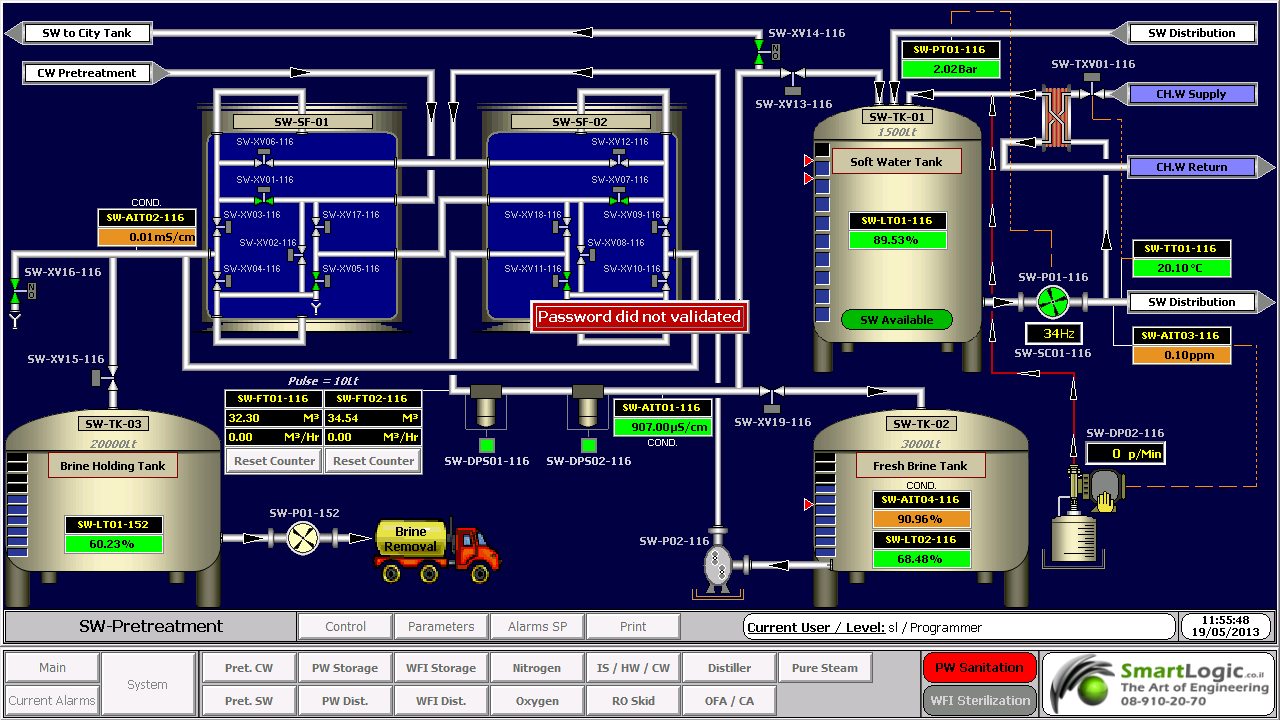
עם השימוש הגדל במחשבים אישיים ובקרים ממוחשביםProgrammable Logic Controller – PLC, הפך HMI למונח  המתייחס לרוב לייצוג הגרפי של הציוד והתהליכים התעשייתיים על פני מסכי המחשבים.

סמארטלוג'יק משתמשת ב -PLCs מתוצרת סימנס (Siemens) ואלן ברדלי (Allen Bradley)  לדוגמא :

6XV1830-0EH10, 6ES7131-4BF00-0AA0,6ES7193-4CA40-0AA0,6ES7134-4GD00-0AB0,6ES7193-4CA40-0AA0, 6ES7138-4CA01-0AA0,6ES7193-4CC20-0AA0, 6ES7590-1AB60-0AA0, 6ES7511-1AK00-0AB0, 6ES7954-8LP01-0AA0,6ES7155-6AU00-0BN0

מונח אחר, פחות שימושי הוא ממשק איש-מכונה הוא  Man-Machine Interface – HMI. מונח זה היה נפוץ אך זכה להתרעמות מצד ארגוני הנשים שדיברו על כך שגם נשים הם משתמשות בממשקים אלו ומהוות חלק מהם כך שונה השם למונח הכללי אדם או באנגלית Human.

HMI מערב ציוד (חומרה) היקפי, ורכיבי תוכנה, כגון ממשקים גרפיים.

בתחום המקושר ל- HMI, שנקרא Human-Computer Interaction – HCI, חוקרים את הייצוב והשימוש בטכנולוגיית המחשב, תוך מיקוד מיוחד בממשקים בין אנשים ומחשבים. החוקרים בתחום זה מתבוננים בצורות שבהם אנשים פועלים מול מחשבים, ומעצבים טכנולוגיות  שמאפשרות אינטראקציה  בין אנשים ומחשבים באופנים חדשים.

אנשים  פועלים מול מחשבים בצורות שונות, והממשק בו משתמשים משחק תפקיד מכריע בהקלה באינטראקציה. אפליקציות במחשב שולחני, דפדפן (browser) אינטרנטי,  מחשבים נישאים, וכו', משתמשות בממשק לשימוש גרפי Graphical User Interface – GUI באופן הנפוץ ביותר; ממשק לשימוש קולי Voice User Interface – VUI, פחות נפוץ, משמש לזיהוי דיבור ומערכות סינתוז synthesizing. השימוש ב- multi-modal GUI מאפשר להשתלב עם גורמים מסוימים שלא ניתנים  לתקשורת עם כלי ממשק אחרים.

שימוש ב-HMI לצורכי בקרה ואוטומציה

בתחום הבקרה והאוטומציה אנו עוסקים רבות בממשק Human-Machine Interface – HMI בעת תכנון ותפעול מערכות בקרה תעשייתיות.

תכנון וביצוע פרויקטים הנדסיים בתחום הבקרה האוטומציה היא המומחיות של סמארטלוג'יק, בקרה מפעלית ובקרות תהליך, בקרות מבנה BMS.  שיטות עבודה שלנו מאפשרות ביצוע אינטגרציה במהירות שיא, בין פרויקט חדש ומערכות המפעל הקיימות. סמארטלוג'יק מבצעת פרויקטי אוטומציה ובקרה מודולארית למתקני יצור תוך שימוש בתקן S-88.  סמארטלוג'יק היא גם  נציגה בלעדית של Siemens בארץ לתמיכה במערכת PCS7 ועובדת על בסיס קבוע, עם מרכז התמיכה העולמי בגרמניה באמצעות מערכת בקרת איכות מחמירה העומדת בתקן ISO9000.

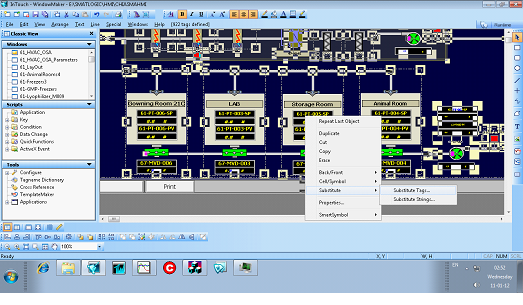
להדרכה איך גורמים ל HMI לעבוד עם הרשאות ווינדוס לחצו כאן.

ולידציה – SSO for Turbine Air Inlet Cooling

   Schedule of System Operation – SSO

Turbine Air Inlet Cooling

This article is an elaborated example of a schedule of system operaton – sso we did for one of our clients. Of course the actual documents contain all the operational and alarm parameters  

                Scope

This Schedule of System Operation (SSO) covers the required technical data and operation logic regarding the components of Turbine Air Inlet Cooling system, according to the Smartlogic's requirements and the client specifications

              System General Description

 :Turbine Air Inlet Cooling system contains two cold liquid circuits

Primary – 4 chillers and their respective primary pumps

Secondary – 2 pumps for each turbine inlet air cooling coil, 2 pumps for Cogen1, 2 pumps for Cogen2, and 2 pumps for the electric generator cooling (one operating and the other in standby

                Applicable Documents

User Requirements Specification (URS) for Monitoring and Alarm System

Parameters List

            Operational Parameters List

                          Alarm Parameters List

                              Operation Logic

            :Start Conditions of Chiller

COND_SYS_RDY Signal is on
Relevant pumps are waiting for our commands, including their corresponding valves

OIL_PUMP_OK Signal is on

READY Signal from MCC (C-025/RD) is on

READY Signal from Chiller (JM-025/RD) is on

ZS (Freeze protector) Signal is off, not indicating alarm

           : Running Logic for Chiller

Start corresponding Reg_valve (condenser regulate valve) on 100% and wait until valve feedback indicating >= 95%

Delay REG_VALVE_DLY_SP – 10 second

:If number of operating chillers <= 2

Send signal to  Start_cond_pump_1 – Start one Condense Pump

:If number of operating chillers > 2

Send signal to  Start_cond_pump2 – Start Two Condense Pumps

Verify from via communication that relevant cond_pump has

Delay 20 seconds

Perform PID on PDIT using Reg_valve according to relevant PDT-081-4_SP DeltaP SP
(in manual and/or auto mode)

Start CHW_Pump, chilled water pump

Delay 30 second

Verify relevant FS (flow) Signal is on for 20 seconds

Start Chiller

           : Stop operation for each Chiller

Delay 2 minutes , safety in case user changed the operation order of chillers from HMI

Stop Chiller

Wait for signal off from motor MCC feedback

Delay 60 Sec

If current chiller is 3rd , Send signal to stop Cond_pump_2

If current chiller is 1st , Send signal to stop Cond_pump_1

Close Reg_valve, condenser regulate valve

Delay 30 Sec

Stop CHW_Pump, chilled water pump
Interlock: in any case, CHW_Pump will continue operating as long as the corresponding chiller is operating

            Consumers Pump activation

User can always choose primary/secondary pump

If demand cooling for cogen1/2 via .DI 20 for cogen 1, DI 21 for cogen 2

For first activation: Check TT-087 (supply water) is below SP +1

:Perform PID control with relevant Cogen-TT
For Cogen-1 TE-315-022, for Cogen-2 TE-316-093
according to TT_315_022_SP / TT_316_093_SP using cogen-1/2 primary pump

If PID control loop reaches >= START_HZ_SP activate secondary pump and Continue PID control loop with both primary and secondary pumps

If both primary and secondary pumps at work and PID control loop reaches <= STOP_HZ_SP deactivate secondary pump and Continue PID control loop with primary pump only

If outlet air from cogen 1 or 2 below setpoint -2°C and the pump speed in minimum for 3 minute, stop the cogen pump

When the outlet air is above set point +1°C for 1 minute start the pump

*Generator equipment is not connected to the our PLC

           :Consumers Pumps activation for generator

If number of operating chillers <= 2 then activate first pump

If number of operating chillers > 2 then activate second pump

Stop pumps using reverse order

            :Temperature control for generator valves

Perform PID control with TT-090 according to SP using TV-088, If 316-J-21A operates

Perform PID control with TT-090 according to SP using TV-089, If 316-J-21B operate

           :Start Conditions of Chiller sequence

Demand Cooling at least from one of Cogen-1 / Cogen-2 / Generator. slot 4 DI-19-20-21

            :Chiller sequence run-up

Start first chiller according ‎6

The chilled water pump in the first chiller will start all the time even if we are not receive "chiller ready to start", we do need to receive "MCC ready" and do not receive "chiller shut down" . this function are necessary when the chiller stop in" low water temperature"

Delay Run-up Start_Chiller_DelaySP delay – 10 minutes

According to demand, start next chiller

:Perform sequence control using the maximum calculated value from
:{Flow measurement} calculation and {Temp measurement} calculation

:By flow measurement

Chiller #2 operates when total flow is > CH2_FLOW_SP + CH_FLOW_OFFSET_ SP

Chiller #3 operates when total flow is > CH3_FLOW_SP + CH_FLOW_OFFSET_ SP

Chiller #4 operates when total flow is > CH4_FLOW_SP + CH_FLOW_OFFSET_ SP

Chiller #2 stops when total flow is <= CH2_FLOW_SP – CH_FLOW_OFFSET_ SP

Chiller #3 stops when total flow is <= CH3_FLOW_SP – CH_FLOW_OFFSET_ SP

Chiller #4 stops when total flow is <= CH4_FLOW_SP – CH_FLOW_OFFSET_ SP

Total flow = FM1 + FM2 + GenFM

Here are some examples of the PLCs used by Smartlogic: 6XV1830-0EH10, 6ES7131-4BF00*0AA0, 6ES7193-4CA40-0AA0, 6ES7134-4GD00-0AB0, 6ES7193-4CA40-0AA0, 6ES7138-4CA01-0AA0, 6ES7193-4CC20-0AA0, 6ES7590-1AB60-0AA0, 6ES7511-1AK00-0AB0, 6ES7954-8LP01-0AA0, 6ES7155-6AU00-0BN0, 1746-NO4V, 1769-L16ER-BB1B

 

ולידציה – 3 Validation case study – part

ולידציה – 3 Validation case study – part

 This article was written by Iian Shaya, validation,automation and control expert

אילן שעיה Ilan Shaya
Ilan Shaya CEO , control and automation specialist and designer

Documentation for IQ and OQ – to be checked at PDI/FAT

Welding reports

Surfaces finishing test reports

PDI and FAT results

As-built drawings, 3 sets in nominated project language, plus 1 set in English

As-installed versions of all documentation submitted for design review

Back-up software on diskette/CD-ROM, as appropriate, ready for re-installment

Machine configuration/start up, set-up and commissioning data, including tabulation of all change parts and identifications

Full machine parts list

Complete documentation (protocols and method statements) required for equipment DQ, calibration, IQ and OQ specified for manual and automatic operations

Calibration certificates for all required instruments to NIST

Specification for all parts manufactured by sub-contractors

Full identification of all parts according to the P&ID, including valves, regulators, instruments, pipes, media and flow direction arrows

Tags for electrical and pneumatic wiring

Documentation to ensure qualification in compliance with FDA and EMEA, as outlined above

DQ Protocols Including PC/PLC

Approval

Statement of purpose

System description

Traceability matrix

IQ Protocols Including PC/PLC

Approval

Statement of purpose

System description

Specifications

Materials in product contact

Engineering drawings

Subsystem inspection

Components

Piping

Valves

Instrumentation and calibrations

PC/PLC requirement definition

Software development documentation

Manual / technical literature

Test equipment data sheet

Component data sheets

Utility requirements

Exceptional conditions, if required

Summary

OQ Protocols Including PC/PLC

Statement of purpose

System description

Manual and automatic control over all modules through HMI

PC/PLC validation protocols

Step-by-step checking of schedule of system operation – SSO

Alarm and message reaction

HMI synoptic screen vs. P&ID

System operation tests

Operation tests for HMI to ensure compliance with 21 CFR part 11

Application software certification

HW documentation

SW code

SW components data sheets

HW components data sheets

PLC configuration

Graph printout

Synoptic screen list and printout

Operation screen list and printout

Parameters list screen

Messages and alarms list, and printout

HW inspections

SW inspections and application

Approved schematic description

Ladder diagram validation

PLC capabilities

PLC accuracy

SW development documentation

List of control devices

Exceptional conditions

Reports – verification of authorization inspection

PQ Protocols Including PC/PLC

Statement of purpose

Analysis procedures

Staff instruction

Plan for sampling

Criteria for acceptance

 This article was written by Iian Shaya, validation,automation and control expert

ולדיציה – Validation case study – part 1

ולדיציה -1 Validation Requirements – case study- part

 This article was written by Iian Shaya, validation,automation and control expert

Validation Requirements is a document which may be part of the validation documentation that describes the validation strategy for a system or subsystem. This document is generic; the system or subsystem may include a PC with Human/Machine Interface (HMI), a Programmable Logic Controller (PLC), virtual hardware (HW), software (SW), and other components designed to maintain the user's facility in proper conditions specified by the user.

Validation Requirements Document Contents

This document is structured in a relatively standard fashion, with predetermined chapters and sections, where the final contents are tailored according to the type and size of the system under validation.

The main chapters and sections of a Validation Requirements document are:

Responsibility

Validation Requirements

Documentation for Initial Tender

Documentation for Design Review

Documentation Prior to Factory Acceptance Test (FAT) or Pre-Delivery Inspection – PDI

Commissioning

Documentation For Installation and Operational Qualification (IQ and OQ) – to be checked at PDI/FAT

Design Qualification (DQ) Protocols (Including PC/PLC) Architecture

Installation Qualification (IQ) Protocols (Including PC/PLC

Operational Qualification (OQ) Protocols (Including PC/PLC

Performance Qualification (PQ) Protocols

Computerized System Validation

Responsibility

This section lists the responsibilities of contractor, the user, and the required contents of the documents composing the validation file

The contractor is responsible for creation and performing the DQ, Design Review, Commissioning, IQ and OQ validation protocols

The user is responsible for creation and performing the PQ validation protocols

Design Qualification (DQ) – The design of the system will be documented and checked in the Design Specification. This specification will include details of the system and must be traceable to the URS and BOD documents

Mechanical Completion Check Report (MCCR) of the system will be documented and checked only by the contractor. This document will check system readiness for the IQ

Commissioning Execution (CE) of the system will be documented and checked only by the contractor. This document will check system readiness for  OQ

Installation Qualification –IQ

IQ will establish documented evidence that the system is installed according to the manufacturers’ specifications and user requirements, and assure that the environment is appropriate for its intended purpose

Each IQ protocol will include an appendix of deviation report, which describes the deviations (if they existent) of the specific system, and the contractor will be responsible to correct them

Operational Qualification – OQ

OQ will establish documented evidence that the system is operated according to manufacturers’ specifications and user requirements, and assure that the environment is appropriate for its intended purpose

OQ will establish documented evidence that the system is operated according to manufacturers’ specifications

.Each OQ protocol will include an appendix of deviation report, which describes the deviations (if they existent) of the specific system, and the contractor will be responsible to correct them

Performance Qualification- PQ

PQ will establish documented evidence that the system performs according to manufacturers’ specifications and user requirements, and assure that the environment is appropriate for its intended purpose

The PQ protocols are user's responsibility

 This article was written by Iian Shaya, validation,automation and control expert

ולידציה – FRS Contents

ולידציה -FRS Contents

 This article was written by Iian Shaya, validation,automation and control expert

The FRS presents functional requirements for installing and operating a monitoring and control system, in response to and compliance with the user's requirements

For example, the FRS may propose to fulfill the URS requirements using a system that includes a PC with control capabilities using HMI screens, PLC, and varied environmental conditions sensors and control devices. The FRS may also propose a color-code display for ongoing environmental conditions, including indications of alarm conditions. An SMS or e-mail notification may be sent to specified personnel in case of specified alarm conditions.

The FRS requirements are organized accordingly with the same order and numbering of sections as the URS for clear correspondence. These requirements are divided into 4 categories- as the user's requirements

Installation Requirements

Operation Requirements

Regulation Requirements

HMI Requirements

Installation Requirements

These requirements cover all the issues regarding system installation to ensure its proper functionality and reliability. Examples of this type of requirements are

List and characteristics of specified hardware (HW) components capable of meeting the system functional requirements

Labeling and identification method for each HW component

List and characteristics of specified software (SW) programs installed on the system PC and the PLC, capable of performing the required operations

Definition of equipment to meet the storage capacity requirements

Definition of equipment and method for achieving the required connections to various types of sensors, communication units, temperature, humidity and pressure transmitters, illumination devices, etc

Definition of equipment and method for achieving the communication compatibility with equipment already installed at the user's facility without extra sensors

Operation Requirements

These requirements cover all the operations that the system must be capable of performing. Examples of this type of requirements are

Environmental conditions (such as pressure, temperature and humidity) to be monitored and controlled

Type of systems to be monitored and controlled, such as Heating, Ventilation and Air Conditioning (HVAC) system, types of sensors, etc

Definition of computerized system capabilities and starting conditions

Definition of system capabilities to recover from failures

List of internal tests to be performed regularly, and alarm indications to be issued in case of failure

Definition of current and historical alarms to be provided regarding all parameters in any case of deviation from the limits specified in the system

Definition of system real-time screens display capabilities

Provision of the following data and HMI displays

Synoptic screens for displaying online values and status

Data logging and storage of historical trends, events and alarms

Tabular screens for displaying events and alarms

Graphical screens for displaying trends

Display of the following information for each alarm

Status -new/acknowledged alarm

Time at which the alarm was activated

Parameter/Tag/Name of the module that activated the alarm

Alarm Description

Alarm Priority

Display of alarms to warn the user, collect alarm history, and enable the user to view current and historical alarms. The system alarms shall include

Component malfunction/failure

Irregularity in parameter reading – such as disconnection of communication lines

Parameters values exceeding the high/low parameter limits

Deviations of system operation from predefined parameters/operations

Method for providing capability to configure the graphs parameters according to

Date and time

Measured parameters

Predefined number of displayed parameters

Definition of trend graphs with maximum and minimum allowed limits of the monitored parameters

Definition of logging interval defined by the user and configured by the supplier

Method for providing capability of authorized user's personnel to define low and high limits and delay time for each

alarm parameter

On FRS regulatory & HMI Requirements you can find out in our next article

 This article was written by Iian Shaya, validation,automation and control expert

אילן שעיה מרצה Ilan Shaya