Smartlogic

ממשק אדם-מכונה HMI – אוטומציה ובקרה

מה זה HMI?

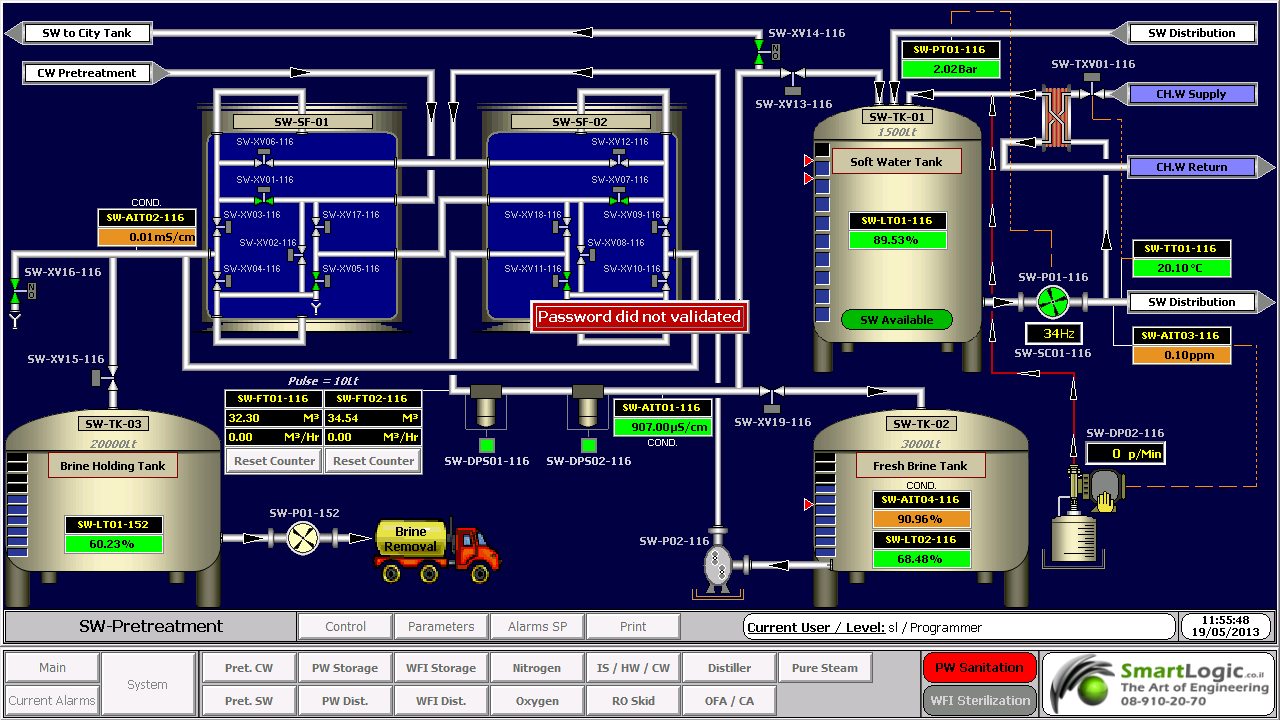
ממשק אדם-מכונה Human-Machine Interface – HMI מתרחש בתחום בו חלה אינטראקציה בן בני אדם ומכונות. מטרת האינטראקציה היא אפשרות  לניטור ובקרה יעילים של  אותן מכונות ע"י מפעיליהן, כאשר המכונות מספקות מידע בהיזון חוזר שמאפשר למפעילים לקחת החלטות נכונות בזמן התהליך. לממשק זה יש שימוש נרחב בעיצוב, יצור ובקרה על ציוד תעשייתי, ועל ניטור ובקרה על תהליכים תעשייתיים.

עם השימוש הגדל במחשבים אישיים ובקרים ממוחשביםProgrammable Logic Controller – PLC, הפך HMI למונח  המתייחס לרוב לייצוג הגרפי של הציוד והתהליכים התעשייתיים על פני מסכי המחשבים.

סמארטלוג'יק משתמשת ב -PLCs מתוצרת סימנס (Siemens) ואלן ברדלי (Allen Bradley)  לדוגמא :

6XV1830-0EH10, 6ES7131-4BF00-0AA0,6ES7193-4CA40-0AA0,6ES7134-4GD00-0AB0,6ES7193-4CA40-0AA0, 6ES7138-4CA01-0AA0,6ES7193-4CC20-0AA0, 6ES7590-1AB60-0AA0, 6ES7511-1AK00-0AB0, 6ES7954-8LP01-0AA0,6ES7155-6AU00-0BN0

מונח אחר, פחות שימושי הוא ממשק איש-מכונה הוא  Man-Machine Interface – HMI. מונח זה היה נפוץ אך זכה להתרעמות מצד ארגוני הנשים שדיברו על כך שגם נשים הם משתמשות בממשקים אלו ומהוות חלק מהם כך שונה השם למונח הכללי אדם או באנגלית Human.

HMI מערב ציוד (חומרה) היקפי, ורכיבי תוכנה, כגון ממשקים גרפיים.

בתחום המקושר ל- HMI, שנקרא Human-Computer Interaction – HCI, חוקרים את הייצוב והשימוש בטכנולוגיית המחשב, תוך מיקוד מיוחד בממשקים בין אנשים ומחשבים. החוקרים בתחום זה מתבוננים בצורות שבהם אנשים פועלים מול מחשבים, ומעצבים טכנולוגיות  שמאפשרות אינטראקציה  בין אנשים ומחשבים באופנים חדשים.

אנשים  פועלים מול מחשבים בצורות שונות, והממשק בו משתמשים משחק תפקיד מכריע בהקלה באינטראקציה. אפליקציות במחשב שולחני, דפדפן (browser) אינטרנטי,  מחשבים נישאים, וכו', משתמשות בממשק לשימוש גרפי Graphical User Interface – GUI באופן הנפוץ ביותר; ממשק לשימוש קולי Voice User Interface – VUI, פחות נפוץ, משמש לזיהוי דיבור ומערכות סינתוז synthesizing. השימוש ב- multi-modal GUI מאפשר להשתלב עם גורמים מסוימים שלא ניתנים  לתקשורת עם כלי ממשק אחרים.

שימוש ב-HMI לצורכי בקרה ואוטומציה

בתחום הבקרה והאוטומציה אנו עוסקים רבות בממשק Human-Machine Interface – HMI בעת תכנון ותפעול מערכות בקרה תעשייתיות.

תכנון וביצוע פרויקטים הנדסיים בתחום הבקרה האוטומציה היא המומחיות של סמארטלוג'יק, בקרה מפעלית ובקרות תהליך, בקרות מבנה BMS.  שיטות עבודה שלנו מאפשרות ביצוע אינטגרציה במהירות שיא, בין פרויקט חדש ומערכות המפעל הקיימות. סמארטלוג'יק מבצעת פרויקטי אוטומציה ובקרה מודולארית למתקני יצור תוך שימוש בתקן S-88.  סמארטלוג'יק היא גם  נציגה בלעדית של Siemens בארץ לתמיכה במערכת PCS7 ועובדת על בסיס קבוע, עם מרכז התמיכה העולמי בגרמניה באמצעות מערכת בקרת איכות מחמירה העומדת בתקן ISO9000.

להדרכה איך גורמים ל HMI לעבוד עם הרשאות ווינדוס לחצו כאן.

אוטומציה ובקרה – איך מגדירים מודם במערכת לשליחת SMS

אוטומציה ובקרה – איך מגדירים מודם עבור שליחת הודעות ממערכת הבקרה

מדריך זה נותן מספר נקודות מפתח להגדרת מודם 

הגדרת המודם

ע"מ להתחבר למודם ולהגדיר את הפרמטרים הרצוים לנו, עלינו להשתמש בתוכנת HyperTerminal. במחשבים אשר מערכת ההפעלה שלהן היא Windows 2000, התוכנה מובנת במערכת ההפעלה. אך במערכות ההפעלה Windows 7 ו-Vista, יש להעתיק את התוכנה מהלינק הזה, ולשים אותה במחשב הרצוי(2 קבצים: אפליקציה ו-DLL).

לאחר שפותחים את HyperTerminal, יש להגדיר חיבור חדש עם הפרמטרים הבאים:

(Port: COM# (# – the number of the port the modem is connected to

Rate: 115000, Usualy

Data bits: 8

Parity: None

Stop bits: 1

Flow Control: Hardware

לפני שמתחברים, יש לוודא כי כל האפליקציות המשתמשות באותו הפורט סגורות!

הצעד הבא הוא להגדיר את הקצב הרצוי לנו: 9600.

יש להריץ את הפקודה הבאה ב-HyperTerminal:

AT+IPR=9600

יש לזכור שלאחר ההגדרה, חייבים להגדיר את ה-HyperTerminal מחדש לקצב של 9600.

לאחר מכן, יש להגדיר את הפורמט של ההודעות כהודעות Text:

AT+CMGF=1

לאחר 2 הגדרות אלו, המודם מוכן לשליחת הודעות SMS. יש לבדוק זאת על ידי השימוש בפקודה הבאה:

<AT+CMGS=”+972#########”<Enter

<Test<Enter<

<Ctrl+Z><Enter>

היכן ש-######### הינו מספר הטלפון הרצוי.

אם עקבת אחר ההוראות לעיל, אתה אמור לקבל הודעת טקסט המכילה את המילה Test.

הגדרת תוכנת ה-U.C.ME

כעת ניתן להגדיר את תוכנת U.C.ME. לאחר ההתקנה, יש לפתוח את U.C.ME Configuration.


This tutorial was written by Iian Shaya, validation, automation and control expert

המדריך נכתב ע"י מר אילן שעיה , מומחה אוטומציה ובקרה.


ולידציה – SSO for Turbine Air Inlet Cooling

   Schedule of System Operation – SSO

Turbine Air Inlet Cooling

This article is an elaborated example of a schedule of system operaton – sso we did for one of our clients. Of course the actual documents contain all the operational and alarm parameters  

                Scope

This Schedule of System Operation (SSO) covers the required technical data and operation logic regarding the components of Turbine Air Inlet Cooling system, according to the Smartlogic's requirements and the client specifications

              System General Description

 :Turbine Air Inlet Cooling system contains two cold liquid circuits

Primary – 4 chillers and their respective primary pumps

Secondary – 2 pumps for each turbine inlet air cooling coil, 2 pumps for Cogen1, 2 pumps for Cogen2, and 2 pumps for the electric generator cooling (one operating and the other in standby

                Applicable Documents

User Requirements Specification (URS) for Monitoring and Alarm System

Parameters List

            Operational Parameters List

                          Alarm Parameters List

                              Operation Logic

            :Start Conditions of Chiller

COND_SYS_RDY Signal is on
Relevant pumps are waiting for our commands, including their corresponding valves

OIL_PUMP_OK Signal is on

READY Signal from MCC (C-025/RD) is on

READY Signal from Chiller (JM-025/RD) is on

ZS (Freeze protector) Signal is off, not indicating alarm

           : Running Logic for Chiller

Start corresponding Reg_valve (condenser regulate valve) on 100% and wait until valve feedback indicating >= 95%

Delay REG_VALVE_DLY_SP – 10 second

:If number of operating chillers <= 2

Send signal to  Start_cond_pump_1 – Start one Condense Pump

:If number of operating chillers > 2

Send signal to  Start_cond_pump2 – Start Two Condense Pumps

Verify from via communication that relevant cond_pump has

Delay 20 seconds

Perform PID on PDIT using Reg_valve according to relevant PDT-081-4_SP DeltaP SP
(in manual and/or auto mode)

Start CHW_Pump, chilled water pump

Delay 30 second

Verify relevant FS (flow) Signal is on for 20 seconds

Start Chiller

           : Stop operation for each Chiller

Delay 2 minutes , safety in case user changed the operation order of chillers from HMI

Stop Chiller

Wait for signal off from motor MCC feedback

Delay 60 Sec

If current chiller is 3rd , Send signal to stop Cond_pump_2

If current chiller is 1st , Send signal to stop Cond_pump_1

Close Reg_valve, condenser regulate valve

Delay 30 Sec

Stop CHW_Pump, chilled water pump
Interlock: in any case, CHW_Pump will continue operating as long as the corresponding chiller is operating

            Consumers Pump activation

User can always choose primary/secondary pump

If demand cooling for cogen1/2 via .DI 20 for cogen 1, DI 21 for cogen 2

For first activation: Check TT-087 (supply water) is below SP +1

:Perform PID control with relevant Cogen-TT
For Cogen-1 TE-315-022, for Cogen-2 TE-316-093
according to TT_315_022_SP / TT_316_093_SP using cogen-1/2 primary pump

If PID control loop reaches >= START_HZ_SP activate secondary pump and Continue PID control loop with both primary and secondary pumps

If both primary and secondary pumps at work and PID control loop reaches <= STOP_HZ_SP deactivate secondary pump and Continue PID control loop with primary pump only

If outlet air from cogen 1 or 2 below setpoint -2°C and the pump speed in minimum for 3 minute, stop the cogen pump

When the outlet air is above set point +1°C for 1 minute start the pump

*Generator equipment is not connected to the our PLC

           :Consumers Pumps activation for generator

If number of operating chillers <= 2 then activate first pump

If number of operating chillers > 2 then activate second pump

Stop pumps using reverse order

            :Temperature control for generator valves

Perform PID control with TT-090 according to SP using TV-088, If 316-J-21A operates

Perform PID control with TT-090 according to SP using TV-089, If 316-J-21B operate

           :Start Conditions of Chiller sequence

Demand Cooling at least from one of Cogen-1 / Cogen-2 / Generator. slot 4 DI-19-20-21

            :Chiller sequence run-up

Start first chiller according ‎6

The chilled water pump in the first chiller will start all the time even if we are not receive "chiller ready to start", we do need to receive "MCC ready" and do not receive "chiller shut down" . this function are necessary when the chiller stop in" low water temperature"

Delay Run-up Start_Chiller_DelaySP delay – 10 minutes

According to demand, start next chiller

:Perform sequence control using the maximum calculated value from
:{Flow measurement} calculation and {Temp measurement} calculation

:By flow measurement

Chiller #2 operates when total flow is > CH2_FLOW_SP + CH_FLOW_OFFSET_ SP

Chiller #3 operates when total flow is > CH3_FLOW_SP + CH_FLOW_OFFSET_ SP

Chiller #4 operates when total flow is > CH4_FLOW_SP + CH_FLOW_OFFSET_ SP

Chiller #2 stops when total flow is <= CH2_FLOW_SP – CH_FLOW_OFFSET_ SP

Chiller #3 stops when total flow is <= CH3_FLOW_SP – CH_FLOW_OFFSET_ SP

Chiller #4 stops when total flow is <= CH4_FLOW_SP – CH_FLOW_OFFSET_ SP

Total flow = FM1 + FM2 + GenFM

Here are some examples of the PLCs used by Smartlogic: 6XV1830-0EH10, 6ES7131-4BF00*0AA0, 6ES7193-4CA40-0AA0, 6ES7134-4GD00-0AB0, 6ES7193-4CA40-0AA0, 6ES7138-4CA01-0AA0, 6ES7193-4CC20-0AA0, 6ES7590-1AB60-0AA0, 6ES7511-1AK00-0AB0, 6ES7954-8LP01-0AA0, 6ES7155-6AU00-0BN0, 1746-NO4V, 1769-L16ER-BB1B

 

ולידציה – 3 Validation case study – part

ולידציה – 3 Validation case study – part

 This article was written by Iian Shaya, validation,automation and control expert

אילן שעיה Ilan Shaya
Ilan Shaya CEO , control and automation specialist and designer

Documentation for IQ and OQ – to be checked at PDI/FAT

Welding reports

Surfaces finishing test reports

PDI and FAT results

As-built drawings, 3 sets in nominated project language, plus 1 set in English

As-installed versions of all documentation submitted for design review

Back-up software on diskette/CD-ROM, as appropriate, ready for re-installment

Machine configuration/start up, set-up and commissioning data, including tabulation of all change parts and identifications

Full machine parts list

Complete documentation (protocols and method statements) required for equipment DQ, calibration, IQ and OQ specified for manual and automatic operations

Calibration certificates for all required instruments to NIST

Specification for all parts manufactured by sub-contractors

Full identification of all parts according to the P&ID, including valves, regulators, instruments, pipes, media and flow direction arrows

Tags for electrical and pneumatic wiring

Documentation to ensure qualification in compliance with FDA and EMEA, as outlined above

DQ Protocols Including PC/PLC

Approval

Statement of purpose

System description

Traceability matrix

IQ Protocols Including PC/PLC

Approval

Statement of purpose

System description

Specifications

Materials in product contact

Engineering drawings

Subsystem inspection

Components

Piping

Valves

Instrumentation and calibrations

PC/PLC requirement definition

Software development documentation

Manual / technical literature

Test equipment data sheet

Component data sheets

Utility requirements

Exceptional conditions, if required

Summary

OQ Protocols Including PC/PLC

Statement of purpose

System description

Manual and automatic control over all modules through HMI

PC/PLC validation protocols

Step-by-step checking of schedule of system operation – SSO

Alarm and message reaction

HMI synoptic screen vs. P&ID

System operation tests

Operation tests for HMI to ensure compliance with 21 CFR part 11

Application software certification

HW documentation

SW code

SW components data sheets

HW components data sheets

PLC configuration

Graph printout

Synoptic screen list and printout

Operation screen list and printout

Parameters list screen

Messages and alarms list, and printout

HW inspections

SW inspections and application

Approved schematic description

Ladder diagram validation

PLC capabilities

PLC accuracy

SW development documentation

List of control devices

Exceptional conditions

Reports – verification of authorization inspection

PQ Protocols Including PC/PLC

Statement of purpose

Analysis procedures

Staff instruction

Plan for sampling

Criteria for acceptance

 This article was written by Iian Shaya, validation,automation and control expert

ולידציה – Validation case study – part 2

ולידציה – Validation case study – part 2

 This article was written by Iian Shaya, validation,automation and control expert

Validation Requirements

Documentation for Initial Tender

Project schedule and milestones design and construction detail

Project quality plan

Supplier’s local subsidiary/agent

Supplier’s documentation that the system / configurable software versions are released to the market and are FDA/EMEA compliant

Compliance to the 21 CFR Part 11 operational requirements – the contractor should ensure covering of all the requirements described below

Contractor to state the system/product status and implementation planned for each requirement – User's approval pre-delivery

Documentation for Design Review

PID for the system

Electrical and pneumatic schematics

:Installation data

General arrangement drawings

Floor loading

Utility requirements

Details of electronic records and approvals that may be subject to regulatory controls under CFR Title 21 part 11

Instrumentation documentation

:Main components specification

Equipment

Instrumentation

Valves

Piping

Control system

Pipe welding documentation

General installation book

Procedures

User guide

Security

Preventative maintenance + spare parts list

Operation procedure

Pressure test procedure

Leak test procedure

Passivation procedure

Calibration

:Functional Design Specifications for

Complete manufacturing system

Software – SW and hardware –HW

Functional Design Specifications

System Detail Design Specifications for HW and SW.

SW source code, with comments, for customized SW

SW complete version history

HMI alarm list, message list and graphical displays

I/O list

:List of materials

Product contact materials

Potential product contact lubricants

Welding procedures for product direct and indirect contact parts

Pre-delivery Inspection and Factory Acceptance Test (FAT) protocols

Steel certificates and gasket certificates

Documentation Prior to FAT or Pre-Delivery Inspection – PDI

:Progress visit report which will include

Mechanical and technical development

Automation and SW development

:Supplier’s factory test results for

Unit tests – The test protocols shall be traced to low level design document and will be approved by the user prior to execution. The approval of the report shall be performed by representatives of the user's validation team, IT QA.

Automation and SW development

:Integration Tests  – Simulation Testing

Approved PDI and FAT protocols

Commissioning

MCCR

Purpose

Scope

Responsibility

Execution instructions

System scope

System description

Drawing verification

Equipment verification

Valve verification

Instrument installation and calibration

Utility verification

Documentations verification

Piping Verification

Sample Point Verification

Safety, health and environment verification

Slopes verification (if relevant)

Electrical and communication activities

Pump installation verification, if relevant

Heat exchanger installation verification, if relevant

Air break verification, if relevant

Dead leg verification, if relevant

CE

Purpose

Scope

Responsibility

Execution instructions

System scope

System description

System startup

Equipment verification

Main equipment operation checks

System FDS (SSO) verification

System performance testing

 This article was written by Iian Shaya, validation,automation and control expert

ולדיציה – Validation case study – part 1

ולדיציה -1 Validation Requirements – case study- part

 This article was written by Iian Shaya, validation,automation and control expert

Validation Requirements is a document which may be part of the validation documentation that describes the validation strategy for a system or subsystem. This document is generic; the system or subsystem may include a PC with Human/Machine Interface (HMI), a Programmable Logic Controller (PLC), virtual hardware (HW), software (SW), and other components designed to maintain the user's facility in proper conditions specified by the user.

Validation Requirements Document Contents

This document is structured in a relatively standard fashion, with predetermined chapters and sections, where the final contents are tailored according to the type and size of the system under validation.

The main chapters and sections of a Validation Requirements document are:

Responsibility

Validation Requirements

Documentation for Initial Tender

Documentation for Design Review

Documentation Prior to Factory Acceptance Test (FAT) or Pre-Delivery Inspection – PDI

Commissioning

Documentation For Installation and Operational Qualification (IQ and OQ) – to be checked at PDI/FAT

Design Qualification (DQ) Protocols (Including PC/PLC) Architecture

Installation Qualification (IQ) Protocols (Including PC/PLC

Operational Qualification (OQ) Protocols (Including PC/PLC

Performance Qualification (PQ) Protocols

Computerized System Validation

Responsibility

This section lists the responsibilities of contractor, the user, and the required contents of the documents composing the validation file

The contractor is responsible for creation and performing the DQ, Design Review, Commissioning, IQ and OQ validation protocols

The user is responsible for creation and performing the PQ validation protocols

Design Qualification (DQ) – The design of the system will be documented and checked in the Design Specification. This specification will include details of the system and must be traceable to the URS and BOD documents

Mechanical Completion Check Report (MCCR) of the system will be documented and checked only by the contractor. This document will check system readiness for the IQ

Commissioning Execution (CE) of the system will be documented and checked only by the contractor. This document will check system readiness for  OQ

Installation Qualification –IQ

IQ will establish documented evidence that the system is installed according to the manufacturers’ specifications and user requirements, and assure that the environment is appropriate for its intended purpose

Each IQ protocol will include an appendix of deviation report, which describes the deviations (if they existent) of the specific system, and the contractor will be responsible to correct them

Operational Qualification – OQ

OQ will establish documented evidence that the system is operated according to manufacturers’ specifications and user requirements, and assure that the environment is appropriate for its intended purpose

OQ will establish documented evidence that the system is operated according to manufacturers’ specifications

.Each OQ protocol will include an appendix of deviation report, which describes the deviations (if they existent) of the specific system, and the contractor will be responsible to correct them

Performance Qualification- PQ

PQ will establish documented evidence that the system performs according to manufacturers’ specifications and user requirements, and assure that the environment is appropriate for its intended purpose

The PQ protocols are user's responsibility

 This article was written by Iian Shaya, validation,automation and control expert

ולידציה – FSD – System Functions and Facilities

ולידציה – FDS – System Functions and Facilities

 This article was written by Iian Shaya, validation,automation and control expert

.The Function Design Specification (FDS) is part of the validation documentation. In this article I will continue to elaborate the  parts of the FSD of system function and the system facilities

Modes of Operation

This section details all modes of operation for the system, including

Automatic/Manual

Start-up/Shutdown

Overrides

Emergency Shutdown

System Failure and Recovery

Functional Operation

This section divides each of the sequential functions into logical areas (determined by the process), and provide complete description of each function, including

Normal Control Functions – such as normal sequencing, control, etc

Interlocks – details of all interlocks within the function

Alarms – lists of all associated alarms and actions for recovery

Operator Requirements

This section describes the interface between the operator and the detailed function. It is probably the most important to the user during the design phase, as it fully details all the functions to be supplied by the system in order to meet the user's requirements. It must be written clearly and concisely, so that operators and users without technical background can visualize the system to be supplied. Inputs from the user should be clearly detailed so that the operational requirements can be determined

Human/Machine Interface – HMI

This section describes in detail all points of operation, local terminals, remote terminal, message displays, pushbutton stations, etc

Where computerized interfaces are used, such as SCADA or HMI, a list of the screens and the proposed content should be included

Dynamic Attributes – dynamic color changes for status

Display Values – Values to be displayed on screen and resolution- No. of decimal places

Input Devices – Operator interaction devices, mouse, keyboard, touch screen, etc

Alarm and Event Displays

Security – Password Access

System Data

All the data gathered, generated or calculated by the system should be detailed. The detailed data should include

Type

Range

Accuracy/Resolution

Scaling

All the data to be stored should be detailed. This includes historical trend data, alarms and events, taking into consideration the following

Location of data to be stored – fixed disk, floppy disk, etc

Retention period – length of time for the data to be maintained

Data Archive – procedures for backup to removable medium

Data Export – export facilities to other formats, such as Excel, Access, Lotus, etc

System interfaces

This section provides complete details of all inputs and outputs from the control system. When separate I/O schedules are generated, these documents must be referenced in the FDS, or else, the complete schedules must be included in the FDS appendix

For digital and analog I/O, this section should provide details of voltage, current, etc., being specific where interfacing to 3rd party equipment. The signal states should be included as follows

Digital inputs – two states

False or Off

True or On

Analog inputs – detailed range

Detailed communication interfaces between systems should include protocols and formats, and also provide complete details of data to be transferred, paying special attention to 3rd party devices

 This article was written by Iian Shaya, validation,automation and control expert

אילן שעיה ilan Shaya

ולידציה – Function Design Specification – FDS

ולידציה – Function Design Specification – FDS

 This article was written by Iian Shaya, validation,automation and control expert

The Function Design Specification (FDS) is part of the validation documentation that details the solution to be provided to meet the user's requirements. It should be approved by the user and should form the basis of the design for both hardware (HW) and software (SW) designs.

The FDS provides the basis of the design of the system and is used to verify and validate the system during the testing, ensuring all the required functions are present and that they operate correctly. It details all the functions, operator interactions control and sequencing associated with the system, thus allowing the user to confirm, before the system is developed that the proposed solution fully meets its requirements.

FDS Contents

The FDS is structured in a relatively standard fashion, with predetermined chapters and sections, where the final contents are tailored according to the type and size of the system under validation. The FDS presented here includes only to the technical contents. It does not include commercial and contractual requirements, which may also be generally included.

The main chapters and sections of an FDS protocol are:

Relationship to Other Documents – lists all documentation used in the production of the FDS. Includes suppliers' documents (such as URS) and drawings. Each document listed should include the document/drawing number and version number. This allows traceability as documents are updated throughout the project life cycle on any impact on the FDS.

System Overview

Process Overview – includes a description of the process being controlled; this may be taken from the URS, enhancing to detail the interaction with the control system.

Control System Overview – includes detailed control system description, with all the components and interaction between the systems; block and network diagrams can be used to show in detail the system architecture

Scope and Limits of Supply

Scope of Supply – includes a list of deliverables, panels, computers, software, etc

Limits of Supply – includes all items outside the scope of the supply required by the project; where interfacing to 3rd party systems, constraints and assumptions should be included

System Functions and Facilities

Operation Modes – includes all modes of operation for the system

Functional Operation – divides each of the sequences functions into logical areas (determined by the process), and provide complete description of each area

Operator Requirements – describes the interface between the operator and the detailed function

Human/Machine Interface- HMI – details all points of operation, local terminals, remote terminal, message displays, push button stations, etc.

Report Outputs – the format of all reports generated by the system should be detailed, and that the format and explanation of the report contents should be included

System Data – all data gathered, generated or calculated by the system should be detailed

System Interfaces – provide complete details of all inputs and outputs from the control system

System Attributes

Availability – defines expected "working" time of the system between failures

Maintainability – details issues related to maintainability of the plant, in particular for systems that require regular maintenance to ensure the reliable operation

Transport and off loading

Power and services required

Connections to existing/3rd party systems

Changes to existing plant or hardware (HW) equipment

Changes to existing software (SW) systems

Training – details the formal and informal training to be supplied under the contract

Design Factors – details special factors relating to the design of the system, standards and methodologies to be followed for both the HW and SW development

Development Factors

Project Control – includes or makes reference to project plans and timescales, along with details of quality requirements, standards, test and integration and configuration management

Resource Requirements – includes the basic project team provided by the supplier, the access required to the customer's premises, and input and timing required by the customer into the project

Test procedures – including details of all test documentation and responsibilities for testing both offline and online

Module and Integration Testing

Factory Acceptance Testing (FAT) – performed at the suppliers premises

Site Acceptance Testing (SAT) – performed on completion of commissioning to demonstrate pre-handover system operation

:Note

As the final contents of the FDS are tailored according to the type and size of the system under validation, and this document is generic, it covers test procedures that may not be necessary in small or simple systems. The following sections cover the FDS issues that require further details

 About the system functions and facilities in our next article FSD System Function & Facilities

 This article was written by Iian Shaya, validation,automation and control expert

אילן שעיה ilan Shaya

ולידציה – FRS – Regulatory & HMI Requirements

ולידציה – FRS – Regulatory & HMI Requirements

 This article was written by Iian Shaya, validation,automation and control expert

Regulatory Requirements

These requirements cover all the FDA specifications regarding the system compliance with the 21 CFR Part 11 definitions, and also with usual validation documentation demands

Method to provide a computerized system that complies with 21 CFR Part 11 definitions, such as the system access control by the user's managing personnel, who shall be responsible for the content of the electronic records (ERs) contained in the system

Method to restrict logical access to the system according to specified authorization levels

Method to restrict logical access to the system only to specific user ID and password

Method to provide system capability to record the values, alarms, user changes and any other events, and provide readable forms and reports of ER data

Method to allow storage of historical events, current alarms and historical alarms data records on the computerized system database

Capability of data display to the user in "view only" mode, so the user cannot alter or delete data/records

Provision of user's capability to backup data daily, weekly and monthly, according to his procedures, to ensure protection of the records and to enable their accurate and ready retrieval throughout the records retention period

Provision by the supplier of a project plan and quality assurance (QA) processes during development and the testing stages as part of his QA systems

Provision by the supplier of the following documents

Functional Requirements Specification – FRS

Functional Design Specification- FDS

IO List

Schedule of System Operation – SSO

Installation Qualification (IQ) protocol

Operation Qualification (OQ) protocol

Performance Qualification (PQ) protocol

HMI Requirements

These requirements are intended to provide the URS demands from the HMI screens, regarding proper graphic design and functionality for controlling and monitoring the system, as specified in customer's contract with the supplier. The HMI screens provided usually are of the following types

Main Screen

Synoptic screens for displaying online values and status

Parameters screens for displaying temperature, humidity and pressure parameters values

Data logging and storage of historical trends, alarms and events

Tabular screens for displaying alarms

Graphical screens for displaying trends

 This article was written by Iian Shaya, validation,automation and control expert

ולידציה – FRS Contents

ולידציה -FRS Contents

 This article was written by Iian Shaya, validation,automation and control expert

The FRS presents functional requirements for installing and operating a monitoring and control system, in response to and compliance with the user's requirements

For example, the FRS may propose to fulfill the URS requirements using a system that includes a PC with control capabilities using HMI screens, PLC, and varied environmental conditions sensors and control devices. The FRS may also propose a color-code display for ongoing environmental conditions, including indications of alarm conditions. An SMS or e-mail notification may be sent to specified personnel in case of specified alarm conditions.

The FRS requirements are organized accordingly with the same order and numbering of sections as the URS for clear correspondence. These requirements are divided into 4 categories- as the user's requirements

Installation Requirements

Operation Requirements

Regulation Requirements

HMI Requirements

Installation Requirements

These requirements cover all the issues regarding system installation to ensure its proper functionality and reliability. Examples of this type of requirements are

List and characteristics of specified hardware (HW) components capable of meeting the system functional requirements

Labeling and identification method for each HW component

List and characteristics of specified software (SW) programs installed on the system PC and the PLC, capable of performing the required operations

Definition of equipment to meet the storage capacity requirements

Definition of equipment and method for achieving the required connections to various types of sensors, communication units, temperature, humidity and pressure transmitters, illumination devices, etc

Definition of equipment and method for achieving the communication compatibility with equipment already installed at the user's facility without extra sensors

Operation Requirements

These requirements cover all the operations that the system must be capable of performing. Examples of this type of requirements are

Environmental conditions (such as pressure, temperature and humidity) to be monitored and controlled

Type of systems to be monitored and controlled, such as Heating, Ventilation and Air Conditioning (HVAC) system, types of sensors, etc

Definition of computerized system capabilities and starting conditions

Definition of system capabilities to recover from failures

List of internal tests to be performed regularly, and alarm indications to be issued in case of failure

Definition of current and historical alarms to be provided regarding all parameters in any case of deviation from the limits specified in the system

Definition of system real-time screens display capabilities

Provision of the following data and HMI displays

Synoptic screens for displaying online values and status

Data logging and storage of historical trends, events and alarms

Tabular screens for displaying events and alarms

Graphical screens for displaying trends

Display of the following information for each alarm

Status -new/acknowledged alarm

Time at which the alarm was activated

Parameter/Tag/Name of the module that activated the alarm

Alarm Description

Alarm Priority

Display of alarms to warn the user, collect alarm history, and enable the user to view current and historical alarms. The system alarms shall include

Component malfunction/failure

Irregularity in parameter reading – such as disconnection of communication lines

Parameters values exceeding the high/low parameter limits

Deviations of system operation from predefined parameters/operations

Method for providing capability to configure the graphs parameters according to

Date and time

Measured parameters

Predefined number of displayed parameters

Definition of trend graphs with maximum and minimum allowed limits of the monitored parameters

Definition of logging interval defined by the user and configured by the supplier

Method for providing capability of authorized user's personnel to define low and high limits and delay time for each

alarm parameter

On FRS regulatory & HMI Requirements you can find out in our next article

 This article was written by Iian Shaya, validation,automation and control expert

אילן שעיה מרצה Ilan Shaya