Smartlogic

אוטומציה ובקרה – חיבור הציוד לתקשורת SATEC

אוטומציה ובקרה – חיבור הציוד לתקשורת SATEC

 במאמר הבא נסקור את הייחודיות של מד ההספק של SATEC וכיצד ניתן להתחבר באמצעותו לרשתות תקשורת

כל דגמי Powermeter (מד הספק) של  SATEC העכשוויים מצוידים באחד או שני פורטים לתקשורת סריאלית המבודדים באופן אופטי. על כן הם מאפשרים פעילות בסוגים שונים של רשתות תקשורת, כולל אלו עם הפרעות של מתח גבוה ושדות מגנטיים.

פורט תקשורת תומך בממשקים סטנדרטיים מסוג   RS-232 eia, RS-422 או RS-485 (לפי בחירת המשתמש או היצרן), שמאפשר חיבור למחשב,PLC* – Programmable Logic Controller או מודם.

התקשורת פועלת במתכונת אדון-עבד (Master-Slave), כאשר המחשב המארח (host) פועל כאדון והמכשיר הנשלט פועל כעבד, ז"א, המחשב משדר בקשות למכשיר שמגיב למחשב; אבל המכשיר לא משדר מידע למחשב ביוזמתו. המחשב המארח סוקר את המכשיר כדי לקבל נתוני מדידה, או כדי לקרוא או לתכנת את הפרמטרים בקונפיגורציה של ה- Powermeter.

חיבורים מסוג multi-drop

מכשירי SATEC ניתנים לשימוש ברשתות מסוג multi-drop. המכשירים מקושרים לרשת דרך פורטים לתקשורת מסוג RS-422 או RS-485. שני פורטים אלו הם סטנדרטיים לממשקים דיפרנציאלים סריאליים (serial differential interface standards). מכיוון שמשתמשים במד דיפרנציאלי, הרעש ברשת כמעט מושתק.

בסטנדרט RS-422, המכשירים מקושרים לרשת דרך שני זוגות חוטי חשמל, זוג אחד לצורך שידור והשני לקליטה (full duplex).

בסטנדרט RS-485, המכשירים מקושרים לרשת דרך זוג אחד של חוטי חשמל, כאשר הזוג הבודד משמש שידור וגם לקליטה (half duplex), ז"א, המשדר והמקלט של המכשיר מחוברים במקביל (in parallel).

הרשת מחוברת לפורט קישור (מסוג RS-422 או RS-485) של מחשב (או PLC) שמשמש כמארח מקומי (local host), או לפורט קישור מחשבי מסוג RS-232 דרך ממיר . RS-232של SATEC. ממיר זה תומך בעד 32 מכשירים ומספק גילוי נתונים אוטומטי automatic data detection)), ללא צורך ב-RTS  חיצוני. המרחק בין הממיר והמכשיר RS-232 יכול להגיע עד 15 מטר. ניתן לחבר מחשב שמשמש כמארח מקומי לרשת דרך ממיר RSC-232 ושני מודמים. הממיר והמודם הראשון מותקנים ביחד עם המכשירים, והמודם השני עם המחשב.

חיבורי תקשורת

ניתן לחבר עד 32 מכשירים לרשת תקשורת מסוגmulti-drop  RS-422/RS-485, שמורכבת מזוג כבלים עם זוגות חוטי חשמל מפותלים ומוגנים (עבור RS-485: 2 זוגות, אחד פעיל ואחד רזרבי; עבור RS-422: 3 זוגות, 2 פעילים ואחד רזרבי). האורך הכולל של הכבל יכול להגיע עד 1200 מטר.

הכבל מורכב מקטעים בין המכשירים. ציפוי ההגנה (shield) של כל קטע כבל מסוג RS-422/RS-485 חייב להיות מחובר לאדמה באחד מקצותיו בלבד. וודא שהפולריות נכונה כאשר אתה מחבר את הטרמינלים (+) ו- ( ) של כל פורט מסוג RS-422/RS-485.

חוטי החשמל בשימוש חייבים להיות בגדלים ביןAWG  22 ו- AWG 12 (mm2 3.30.3-).

מומלץ להשתמש ברצועת טרמינל בכל חיבור של מכשיר לרשת, כדי לאפשר פירוק קל של מכשיר במידת הצורך.

קונפיגורציות של חיווט

רשת מסוג  multi-dropחייבת קונפיגורציה של נקודה-לנקודה (point-to-point configuration), ז"א, הטרמינלים (+) ו- ( -) של כל מכשיר חייבים להיות מחוברים לטרמינלים המתאימים של המכשיר הבא. מומלץ להשתמש בשיטת חיווט בקו ישר. חייבים להימנע מכל חיבור עם ענף בקו העיקריmain bus) ), כגון שיטות כוכב (star) ו-T  (tee); במקרים אלו יווצרו השתקפויות (reflections) של אותות שעלולות לגרום להתאבכות (interference) ראה איורים 1-4 (1-4Figures ).

כל נקודה סופית בקו העיקריmain bus) ) חייבת להסתיים עם נגד של1/4  ווט (Watt). נגדים אלו מצמצמים את השתקפויות Aעלולים לשבש את אותות הנתונים על הקו. נגדים אלו מחוברים בין הטרמינלים (+) ו- (- ) של המכשירים בכל קצה של הקו העיקרי. (כאשר משתמשים בממיר RSC-232 בחיבור למחשב, הנגד לא ישים מכיוון שהוא כבר מחובר בתוך הממיר). ערך הנגד חייב להתאים לאימפדנס הקווי (line impedance) של הכבל בשימוש, הערך האופייני נע בין 200 ו- 500 אוהם (Ohm).

רשתות תקשורת מסוג single-drop

מכשיר אחד יכול להתחבר למחשב מארח (computer host) אחד או לפורט קישור של מודם RS-232.

החיבור מחייב כבל עם זוגות חוטי חשמל מפותלים ומוגנים (3 זוגות: אחד פעיל, אחד מחודר לאדמה ואחד רזרבי). אורך יכול להגיע עד 15 מטר ניתן להאריך את המרחק הזה תוך שימוש בקצב שידור baud נמוך יותר, כבלים עם ציפוי ההגנה (shielded) או משחזר (repeater).

חוטי החשמל בשימוש חייבים להיות בגודלAWG  24 (mm2 0.5).

פרוטוקולים של תקשורת

כל מכשירי SATEC תומכים לפחות בשני פרוטוקולים: ASCII ו- Modicon Modbus RTU. שניהם פרוטוקולים פתוחים שניתנים לשימוש ע"י תוכנה של מארח ששייך לגוף שלישי  (third-party host-based software) נגישים לכל הנתונים ורגיסטרים של קונפיגורציה (registers configuration) של Powermeter.

מכשירים רבים של SATEC תומכים גם בפרוטוקול DNP3.0.

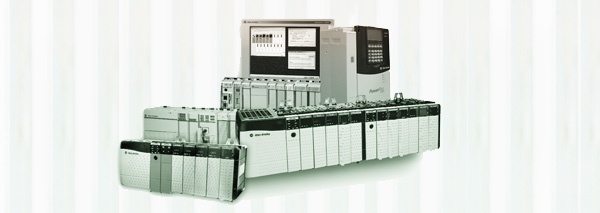
*סמארט לוג’יק משתמשת בבניית מערכות אוטומציה ובקרה בבקרים של חברת Siemens  וחברת אלן ברדלי – Allen-Bradley

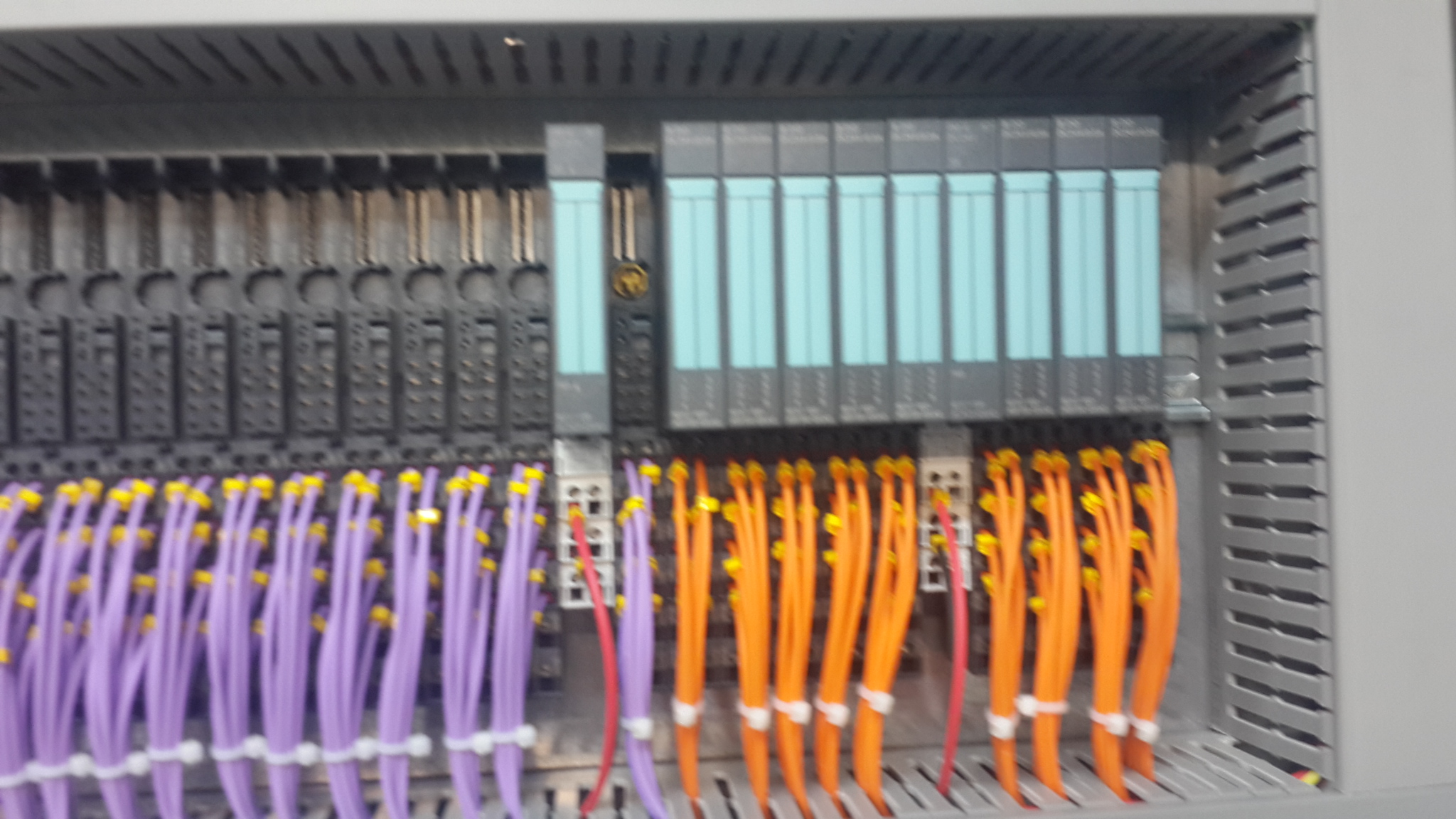
דוגמאות ל- PLCs  בשימוש סמארטלוג’יק:

6XV1830-0EH10, 6ES7131-4BF00-0AA0, 6ES7193-4CA40-0AA0, 6ES7134-4GD00-0AB0, 6ES7193-4CA40-0AA0, 6ES7138-4CA01-0AA0, 6ES7193-4CC20-0AA0, 6ES7590-1AB60-0AA0, 6ES7511-1AK00-0AB0, 6ES7954-8LP01-0AA0, 6ES7155-6AU00-0BN0, 1746-NO4V, 1769-L16ER-BB1B


אוטומציה ובקרה – ISA-88

אוטומציה ובקרה – ISA-88

הגדרת ISA

 International Society of Automation – ISA זוהי אגודה טכנית הפועלת ללא מטרות רווח, מיועדת לכל מי שעובדים, לומדים או מעוניינים באוטומציה תעשייתית ועיסוקים מקושרים לנושא, כגון מכשור.

 ISA כוללת תחומים טכניים והנדסיים רבים, והינה אחת מהארגונים המובילים בעולם בקביעת סטנדרטים והדרכת אנשי מקצוע בתעשייה בנושא אוטומציה.

הגדרת ANSI

American National Standards Institute –  ANSI הוא ארגון פרטי ללא מטרות רווח שמפקח על פיתוח תקנים מוסכמים בהתנדבות, עבור מוצרים, שירותים, תהליכים, מערכות וכוח אדם בארה"ב. ארגון זה גם מתאם בין תקנים אמריקאים ובינלאומיים, כך שמוצרים אמריקאים יוכלו להיות משווקים בכל העולם.

ANSI מאשרת תקנים מפותחים ע"י נציגים של ארגונים, סוכנויות ממשלתיות, קבוצות צרכנים, חברות, וגופים אחרים. תקנים אלו מבטיחים שתכונות וביצועי המוצרים הם אחידים, שהציבור משתמש באותם הגדרות ומינוחים, ושהמוצרים נבדקים באותה צורה. ANSI גם מספקת אישורים לארגונים שמסמיכים מוצרים או כוח אדם בהתאם לדרישות מוגדרות בתקנים בינלאומיים.

ISA88   פרסם סדרה של סטנדרטים על בקרת אצווה (batch control) עבור מערכות אוטומציה תעשייתיים. סטדרטים אלו משמשים בתכנון והפעלה של מערכות תעשייתית שונות.

לדוגמא: S88 , קיצור ל- ANSI/ISA-88, הוא סטנדרט שמתייחס לבקרה על תהליך אצווה (batch process) , מיועד לתיאור ציוד ותהליכים. זה לא סטנדרט לתוכנה, וניתן לשימוש גם לתהליכים ידניים

להלן הסטדרטים והתהליכים להן הם משמשים:

ANSI/ISA-88.00.01-2010 Batch Control Part 1: Models and Terminology

מספק מודלים וטרמינולוגיה סטנדרטיים להגדרת דרישות עבור מתקנים ליצור אצווה batch.

ISA-88.00.02-2001 Batch Control Part 2: Data Structures and Guidelines for Languages

מגדיר מודלים של נתונים שמתארים בקרת אצווה (batch control) לשימוש במערכות אוטומציה לתעשייה, מבני נתונים שמסייעים לתקשורת בתוך ובין יישומים  של בקרת אצווה, וקווי מנחה של השפה לייצוג מתכונים (recipes).

ISA-88.00.03-2003 Batch Control Part 3: General and Site Recipe Models and Representation

מגדיר מודל למתכון כללי (general recipe) ולמתכון באתר (site recipe), הפעילויות שמתארות את השימוש במתכונים (recipes) אלו בתוך חברה ובין חברות, ייצוג של שני סוגי המתכונים, ומודל נתונים עבור שני סוגי המתכונים.

ANSI/ISA-88.00.04-2006 Batch Control Part 4: Batch Production Records

מספק הגדרה מפורטת עבור לרשומות של ייצור אצווה  (batch production records), וקובעים מודל ייחוס לפיתוח אפליקציות לצורך אחסון ו/או החלפות של  רשומות של ייצור אצווה . היישומים המבוססים על סטנדרט זה מאפשרים אחזור, ניתוח ודיווח של נתונים רשומים על ייצור אצווה  לפי בחירה.

Part 5: Implementation Models & Terminology for Modular Equipment Control

סטנדרט זה נמצא בשלב פיתוח, ביחד עם פרויקט Make2Pack

בסמארטלוג'יק אנו מתמחים בתכנון תהליך בתקן   S-88 מאפיון  Control-Modules דרך Equipment modules וכלה בפאזות תהליכיות. תוכלו לקבל שרותים המסתמכים על ידע וניסיון רב בעבודה עם מערכות מים, RO ,CIP, מזקקות, מערכות HVAC ,Utilities, ומודולים מוכנים סטנדרט S-88 שפיתחנו עבור מערכות אלו

אוטומציה ובקרה – מערכות SCADA ו- DCS

אוטומציה ובקרה – מערכות SCADA ו- DCS

שתי מערכות חשובות בתחום מערכות בקרה תעשייתיות Industrial Control System – ICS – הן:

  • Supervisory Control and Data Acquisition – SCADA
  • Distributed Control System – DCS


SCADA היא מערכת שפועלת בעזרת אותות מקודדות דרך ערוצי תקשורת ומספקת בקרה על ציוד בשלט רחוק (תוך שימוש אופייני בערוץ תקשורת אחד עבור תחנה מרוחקת אחת). מערכת הבקרה ניתנת לשילוב עם מערכת להשגת מידע ע"י הוספת שימוש באותות מקודדות דרך ערוצי תקשורת להשגת מידע על הסטטוס של הציוד המרוחק לצורך תצוגה או רישום של הפונקציות.

מערכת  SCADAכוללת בדרך כלל את התת-מערכות הבאות:

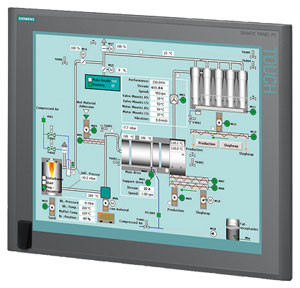
  • ממשק אדם-מכונה (HMI – Human-Machine Interface), שמציג מידע על התהליך למפעיל, וכך מאפשר למפעיל לנתר ולבקר את התהליך.
  • מערכת פיקוח, שצוברת מידע על התהליך ושולחת הוראות כדי לבקר את אותו תהליך.
  • יחידות מסוף רחוקות RTUs) – Remote Terminal Units ), שמתחברות לגששים (sensors), ממירים את אותות הגששים לנתונים דיגיטליים, ושולחים את הנתונים הדיגיטליים למערכת הפיקוח.
  • בקרים לוגיים שניתנים לבקרה (PLCs – Programmable Logic Controllers ), שמשמשים כמתקני שדה, מכיוון שהם יותר כלכליים, מגוונים, גמישים וניתנים לתצורה (configuration) מיחידות RTU בשימושים מיוחדים.
  • תשתית תקשורת, שמקשרת את מערכת הפיקוח ליחידות RTU.


DCS היא מערכת בקרה עבור תהליך או מתקן, שבה רכיבי הבקרה ממוקמים בפיזור במערכת המבוקרת. מערך זה מבדיל את ה- DCS ממערכות לא מפולגות, שמשתמשות בבקר יחיד במיקום מרכזי. DCS משתמשת בצורה אופיינית במעבדים (processors) מותאמים למשימה, שמאורגנים בהיררכיה ומקושרים ע"י רשתות תקשורת לצורך ניתור ובקרה.


ההבדלים העיקריים ביןSCADA  ו- DCS הם:

  • SCADAמותאמת להשגת מידע, בעוד ש- DCS מותאמת לבקרת תהליך.
  • SCADA מונעת לצורך אירוע (event), בעוד ש – DCS מונעת לצורך תהליך (process).
  • SCADA עדיפה לאפליקציות מפוזרות במיקומים גאוגרפיים נרחבים, בעוד ש- DCS משמש בד"כ לטיפול בתהליכים שמתנהלים במקום אחד.
  • SCADA אמורה לתפקד למרות תקלה בתחום התקשורת, בעוד שתחנות מפעילי ה- DCS תמיד מחוברות לכניסה/יציאה (I/O -Input/Output).

לחברת סמארט לוג'יק צוות מומחים בעלי שם וניסיון רב,  דרך שיטות עבודה מתקדמות הדוגלת במודולאריות וסדר, פיתחנו בסמארט לוג'יק שיטה המאפשרת השלמת פרויקטים מורכבים, יעילים ואיכותיים תוך   שמירה על לוח זמנים קצר במיוחד ומחיר תחרותי.  החברה מספקת תכנון והקמת מערך אוטומציית בקרה של מתקן יצור שלם, בקרה ואוטומציה למערכות טיפול במים, בקרות למערכות חימום, אוורור ומיזוג אוויר  (תמונה) (HVAC) תואמים את דרישות המנהל האמריקאי (FDA) ועוד.


אוטומציה ובקרה – העלאת תוכנה מבקר סימנס

ולידציה – מצגת אוטומציה ובקרה תוך שימוש ב – 21CFR Part 11

למצגת לחץ על הלינק הבא :בקרה ואוטומציה תוך שימוש ב 21 CFRPart11

להורדת סילבוס ולהרשמה לקורס 21CFR Part 11 לחץ כאן

אוטומציה ובקרה – תזמון הרצת סקריפטים בסימפליסיטי

ולידציה – GAMP – Test Execution – part 2

GAMP -Automated Test Execution and Computerized Test Management Tools

As I've promised on my last post – Good Automated Manufacturing Practice (GAMP) Test Execution – part 1 I will now continue to elaborate on the execution of a test using automated (computerized) test tools. These tools should be conducted in accordance with the Test Plan or Strategy. This should require that all automated tools used to test GxP systems have been subjected to assessment and appropriate validation prior to their use, in order to establish s a high degree of assurance that they will perform as intended, and return accurate and secure results.

Before discussing the benefits and use of automated test tools, it is useful to describe the difference between a computerized test management tool and automated testing.

A computerized test management tool facilitates the task of Test Case and Test Script authoring, review and approval (pre and post execution), test execution, and test deviation management. This is accomplished using workflow enabled processes, electronic test artifact management (i.e., Test Cases, Test Scripts, Deviation Reports), and possibly electronic signatures.

However, even with computerized test management, the actual test execution is performed by the tester, even when this task is aided by the presentation of on-screen test scripts and electronic capture of test evidence. The tester must still manually follow the test steps, provide inputs to the system under test, and record the test evidence.

With automated test execution, the computerized test tool also executes the actual test and records the test evidence. This can significantly reduce the test execution time. Because most automated test execution is based upon initial manual test execution (where the tool often 'records' the manual actions of the tester), automated testing is most often used when executing tests during a second test cycle and is well sited to regression testing.

Benefits of Computerized Test Management Tools and Automated Test Execution

When planned properly, automating the test activities can bring considerable benefits within the project life cycle. However, if poorly planned, computer based tools and test automation may be difficult, complex, and time consuming task, with little or no return on investment.

Computerized test management tools can significantly reduce the amount of paper used during testing and provide helpful test management support. This includes the ability to report on the test activities status and facilitate test activities using workflow. In most large testing projects, the use of such tool can reduce testing timescales.

Not every aspect of a computerized system can be automatically tested. A key factor in the successful use of such tools is the early identification of the types of tests that should be automated, and the types of tests to be executed manually.

While computerized test management tools and automated testing can both provide benefits, they should be considered separately. Some project may benefit from the use of computerized test management tools, but may derive little benefits using automated test tools.

Before deciding on the usefulness of computerized test management and automated test tools, the following points should be considered:

Will the tools be used in a single project or more broadly within the organization? Typically in a large project or organization, a wide use is necessary to provide return on investment.

How many test cycles are typically executed, and how much regression testing is required? This will help determine the need for automated testing.

Will the tool be used by a dedicated test team, or in all projects? This has an impact on on-going administration and training requirements.

The use of computerized test management and automated test tools need to be regarded as a SW development activity that has its own life cycle. These tools will have their own implementation and validation life cycle. This will place additional requirements on the test team, particularly in terms of the skills required by test script developers.

The use of these tools is only effective if supported by adequate processes and if the staff has the necessary skills to use the tools effectively. The usability of a test tool is significantly enhanced if it is application-interdependent (i.e., used to test multiple application).

Easy maintenance of a test suite is crucial for a successful implementation of an automated test tool.

Automated test tools which include a version and configuration management can significantly improve the effectiveness and efficiency of retesting.

Features of Computerized Test Management and Automated Test Tools

Different test management and automated test tools are used In the IT industry, and the architecture of the application under test often determines the most suited tool. Most tools are purchased as configurable off-the-shelf SW packages, and the test team then configures the package locally to meet the particular usage required.

Before acquiring computerized test management tools or automated test tools, it is important that an organization understands and defines the requirements and form of use.

Test Management Tools

Test management tools may be classified into four general types:

General computerized test management tools

Developer-oriented tools

Functional test tools

Load and performance related tools

General Computerized Test Management Tools

Manage testing across the project.

Facilitates authoring, review and approval of Test Cases and Test Scripts, often using workflow and electronic signatures.

Allow developers, testers and project managers to track tests being run on various applications.

Trace tests back to their original requirements.

Summaries the defects found during the testing process.

The test management tools help to determine whether changes need to be made to the automated test tools themselves, as a result of changes to the applications being tested. However, they do not provide the facility to automate test execution.

Other tools do provide automated test execution (often integrated into the test management tools). The type of automated test execution tool depends to a large extent on the type of SW application under test and the type of test being executed. Three such tools are presented below

Developer-Oriented Tools

Are used in unit, component and module testing to address issues such as memory leaks or other early performance problems.

Are used to test specific pieces of the developer's application code independent of other units of code within the SW application.

May incorporate capture-replay utilities, which run sample tests against working versions of a program, capturing the activity it generates. During the playback phase, developers can see whether or not they are generating the results they expected.

Are particularly useful in testing large applications where different developers are working on different parts of the application.

Test that the code being developed is acting as expected.

Often contain keyword or table driven execution engines, which allow the development and execution of repeatable tests.

Often have scripting capabilities, allowing testers to modify their scripts to test additional items.

Can often be linked back to other packages providing Requirements Capture and Tracking capabilities, thus facilitating comprehensive requirements traceability.

Are particularly useful to test what happens to the code when multiple users access the application simultaneously, or transactions are required to be submitted, or responses are achieved in tight deadlines that manual testing could not reproduce accurately or consistently.

Are particularly useful for critical web based applications, because it is often difficult to predict the volatility of load change. Tools developed for this type of work can often drill down to lower levels of the code to find out where the bottlenecks are, and what is causing any delays.

These tools can also be valuable when testing the application scalability.

Functional Test Tool

Load and Performance Related Tools

Use of Computerized Test Management and Automated Test Tools

As stated above, Computerized Test Management Tools and Automated Test Tools can prove advantageous on large projects or within an organization. However, the use of such tools will require:

Use of testing procedures (SOPs or Work Instructions) for the activities supported by the tools, such as:

Test Case / Test Script authoring

Test Case / Test Script review and approval

Test execution

Test result review and approval

Test defect reporting

Test defect categorization

Test defect disposition

Test defect closure

Other activities, such as test planning and test status reporting, are less critical from a regulatory perspective and will not require formal procedures.

Users of the test tools that are properly trained in the use of the procedures.

Administration of the tool, including:

Configuration of the tool

Creation of test projects

Administration of users

Support and maintenance activities (backup and restore, capacity planning and performance monitoring, etc.)

Smartlogic ,when implementing test tools, initially defines the test processes to be supported by the tool(s). These test processes should comply with the testing good practices defined by GAMP, and the specific test policies and processes of the owning organization, which should define the requirements for using this tool(s).

All users of the test tools should be trained, not only in the use of the tools, but also in good testing practices.

When using test tools, clear user roles and responsibilities should be defined for each test process. Appropriate technical or procedural access restrictions should ensure that only authorized users are allowed to fulfill a defined role, and that the independence of the test process can be verified and enforced.

When used, computerized test management tools and automated test execution tools should provide the same level of test data integrity as an equivalent paper based process.

All these conditions and requirements can be facilitated through the use of features such as:

Role based authorities and user restrictions

Use of workflow to enforce test processes

Use of electronic or digital signatures

Secure, computer generated audit trails

Verification of Computerized Test Management and Automated Test Tools

The need to assure the security, integrity and availability of test data requires the appropriate selection and verification of the automated test tools (refer to GAMP 4, Appendix M4, section 4 for further details). Because such tools usually have only an indirect impact on product quality, they are considered low risk priority and do not require a detailed a lengthy validation process.

The verification of a computerized test management or automated test tools should focus on demonstrating that the tools are fit for purpose as far as critical requirements are concerned. The critical requirements that should form the basis of the tool verification are:

Security of the test data, facilitated by role based authorities and user restrictions, the use of electronic or digital signatures, and the use of secure, computer generated audit trails. Where the tools do not provide these features, the verification of the tool(s) should focus on establishing such security using logical or physical security controls, procedural controls and paper based audit trails.

Ability of the test tool to enforce defined test processes using workflow or equivalent controls. Where this is not possible, the verification of the tool(s) should focus on the ability of the tool to provide audit trail evidence of the test processes.

The scope of the verification activities may be scaled based upon risk, and should take into account the track record of the supplier and tools in the life sciences.

Test data managed within test tools would not usually be determined to be an electronic record within the scope of predicate rules, and the use of electronic or digital signatures would not usually be determined within the scope of predicate rules, so that the requirements of regulations such as 21 CFR Part 11 would not usually apply.

However, there may be cases where the SW or application tested using such tools is of greater regulatory significance, for example, where the SW or application is defined as a medical device or part of it. In these cases, a more formal validation of the test may be required:

The test record may also be determined to be an electronic record (i.e., an acceptance record under 21 CFR Part 820 Subpart H – Acceptance Activities).

Any associated signatures may be determined to be electronic or digital signatures (i.e., under 21 CFR Part 820.80).

The test management tools may need to comply with the requirements of 21 CFR Part 11, and other regulator guidance in electronic records and digital signatures


אוטומציה ובקרה – Configure new WW intoch installation

-אוטומציה ובקרה – איך גורמים ל HMI לעבוד עם הרשאות ווינדוס

אוטומציה ובקרה – PLC – Programmable Logic Controller

אוטומציה ובקרה – PLC – Programmable Logic Controller

A Programmable Logic Controller – PLC is a digital computer used for automation of electromechanical processes, such as control of machinery on factory assembly lines. Unlike general-purpose computers, the PLC is designed for multiple inputs and output arrangements, extended temperature ranges, immunity to electrical noise, and resistance to vibration and impact. Programs to control machine operation are typically stored in battery-backed-up or non-volatile memory. A PLC is an example of a hard real time system since output results must be produced in response to input conditions within a limited time, otherwise unintended operation will result.

PLCs are usually programmed using application software (SW) on personal computers (PCs). The PC is connected to the PLC through Ethernet, RS-232, RS-485 or RS-422 cabling. Most PLCs used by smartlogic when designing an automation and control systems are the Siemens PLC and Allen Bradley's.The programming SW allows entry and editing of the ladder-style logic. Generally the SW provides functions for debugging and troubleshooting the PLC software, for example, by highlighting portions of the logic to show current status during operation or via simulation. The SW will upload and download the PLC program, for backup and restoration purposes.

PLC Functionality

The functionality of the PLC includes sequential relay control, motion control, process control, distributed control systems and networking. The data handling, storage, processing power and communication capabilities of some modern PLCs are approximately equivalent to desktop computers.

PLC Features

The PLC unit consists of separate elements, such as power supply, controller, relay units for in- and output

The main difference from other computers is that PLCs are armored for severe conditions (such as dust, moisture, heat, cold) and have the facility for extensive input/output (I/O) arrangements. These connect the PLC to sensors and actuators. PLCs read limit switches, analog process variables (such as temperature and pressure), and the positions of complex positioning systems. On the actuator side, PLCs operate electric motors, pneumatic or hydraulic cylinders, magnetic relays, solenoids, or analog outputs. The input/output arrangements may be built into a simple PLC, or the PLC may have external I/O modules attached to a computer network that plugs into the PLC.

 Here are some examples of the PLCs used by Smartlogic: 6XV1830-0EH10, 6ES7131-4BF00-0AA0, 6ES7193-4CA40-0AA0, 6ES7134-4GD00-0AB0, 6ES7193-4CA40-0AA0, 6ES7138-4CA01-0AA0, 6ES7193-4CC20-0AA0, 6ES7590-1AB60-0AA0, 6ES7511-1AK00-0AB0, 6ES7954-8LP01-0AA0, 6ES7155-6AU00-0BN0, 1746-NO4V, 1769-L16ER-BB1B